> ## Documentation Index
> Fetch the complete documentation index at: https://cometchat-22654f5b-feature-card-builder.mintlify.site/llms.txt
> Use this file to discover all available pages before exploring further.

# Users

> Searchable, scrollable list of users with selection support and real-time presence updates.

<Accordion title="AI Integration Quick Reference">
  ```json theme={null}
  {
    "component": "CometChatUsers",
    "package": "@cometchat/chat-uikit-react",
    "import": "import { CometChatUsers } from \"@cometchat/chat-uikit-react\";",
    "description": "Searchable, scrollable list of users with selection support and real-time presence updates.",
    "cssRootClass": ".cometchat-users",
    "primaryOutput": {
      "prop": "onItemClick",
      "type": "(user: CometChat.User) => void"
    },
    "props": {
      "data": {
        "usersRequestBuilder": {
          "type": "CometChat.UsersRequestBuilder",
          "default": "SDK default (30 per page)",
          "note": "Pass the builder instance, not the result of .build()"
        },
        "searchRequestBuilder": {
          "type": "CometChat.UsersRequestBuilder",
          "default": "undefined"
        },
        "searchKeyword": {
          "type": "string",
          "default": "undefined"
        },
        "activeUser": {
          "type": "CometChat.User",
          "default": "undefined"
        },
        "sectionHeaderKey": {
          "type": "keyof CometChat.User",
          "default": "undefined"
        }
      },
      "callbacks": {
        "onItemClick": "(user: CometChat.User) => void",
        "onSelect": "(user: CometChat.User, selected: boolean) => void",
        "onError": "((error: CometChat.CometChatException) => void) | null",
        "onEmpty": "() => void"
      },
      "visibility": {
        "hideUserStatus": { "type": "boolean", "default": false },
        "hideSearch": { "type": "boolean", "default": false },
        "showSectionHeader": { "type": "boolean", "default": true },
        "showSelectedUsersPreview": { "type": "boolean", "default": false },
        "showScrollbar": { "type": "boolean", "default": false }
      },
      "selection": {
        "selectionMode": {
          "type": "CometChatUsersSelectionMode",
          "values": ["'none'", "'single'", "'multiple'"],
          "default": "'none'"
        }
      },
      "viewSlots": {
        "itemView": "(user: CometChat.User) => ReactNode",
        "leadingView": "(user: CometChat.User) => ReactNode",
        "titleView": "(user: CometChat.User) => ReactNode",
        "subtitleView": "(user: CometChat.User) => ReactNode",
        "trailingView": "(user: CometChat.User) => ReactNode",
        "headerView": "ReactNode",
        "loadingView": "ReactNode",
        "emptyView": "ReactNode",
        "errorView": "ReactNode",
        "options": "(user: CometChat.User) => CometChatUserOption[]"
      }
    },
    "events": [],
    "eventsReceived": [
      {
        "name": "ui:user/blocked",
        "payload": "{ user: CometChat.User }",
        "description": "Updates user in the list (shows blocked state)"
      },
      {
        "name": "ui:user/unblocked",
        "payload": "{ user: CometChat.User }",
        "description": "Updates user in the list (removes blocked state)"
      }
    ],
    "sdkListeners": [
      "onUserOnline",
      "onUserOffline"
    ],
    "types": {
      "CometChatUserOption": {
        "id": "string",
        "title": "string",
        "iconURL": "string | undefined",
        "onClick": "(user: CometChat.User) => void"
      },
      "CometChatUsersSelectionMode": "'none' | 'single' | 'multiple'"
    }
  }
  ```
</Accordion>

## Overview

`CometChatUsers` is a list component that renders all available users in the app. It emits the selected `CometChat.User` via `onItemClick`. Wire it to `CometChatMessages` or use it as a user picker in flows like "new conversation" or "add members to group."

<Info>
  **Live Preview** — interact with the default users list.

  [Open in Storybook ↗](https://storybook.cometchat.io/react/?path=/story/components-users-cometchat-users--default)
</Info>

<iframe src="https://storybook.cometchat.io/react/iframe.html?id=components-users-cometchat-users--default&viewMode=story&shortcuts=false&singleStory=true" className="w-full rounded-xl" loading="lazy" style={{height: "700px", border: "1px solid #e0e0e0"}} title="CometChat Users — Default" allow="clipboard-write" />

The component handles:

* Paginated fetching with infinite scroll
* Real-time presence updates (online/offline)
* Search filtering
* Alphabetical section headers
* Selection mode (single/multiple) with optional preview chips

***

## Usage

### Flat API

```tsx theme={null}
import { CometChatUsers } from "@cometchat/chat-uikit-react";

function UserPicker() {
  return (
    <CometChatUsers
      onItemClick={(user) => {
        console.log("Selected user:", user.getName());
      }}
    />
  );
}
```

### Compound Composition

```tsx theme={null}
import { CometChatUsers } from "@cometchat/chat-uikit-react";

function UserPicker() {
  return (
    <CometChatUsers.Root onItemClick={handleClick}>
      <CometChatUsers.Header title="Users" />
      <CometChatUsers.SearchBar placeholder="Search users..." />
      <CometChatUsers.LoadingState />
      <CometChatUsers.ErrorState />
      <CometChatUsers.EmptyState>
        <p>No users found.</p>
      </CometChatUsers.EmptyState>
      <CometChatUsers.List />
    </CometChatUsers.Root>
  );
}
```

### New Conversation Example

```tsx theme={null}
import { useState } from "react";
import { CometChat } from "@cometchat/chat-sdk-javascript";
import {
  CometChatUsers,
  CometChatMessageHeader,
  CometChatMessageList,
  CometChatMessageComposer,
} from "@cometchat/chat-uikit-react";

function NewChat() {
  const [user, setUser] = useState<CometChat.User | undefined>();

  return (
    <div style={{ display: "flex", height: "100vh" }}>
      <div style={{ width: 360 }}>
        <CometChatUsers onItemClick={(u) => setUser(u)} activeUser={user} />
      </div>
      {user && (
        <div style={{ flex: 1, display: "flex", flexDirection: "column" }}>
          <CometChatMessageHeader user={user} />
          <CometChatMessageList user={user} />
          <CometChatMessageComposer user={user} />
        </div>
      )}
    </div>
  );
}
```

***

## Filtering

Pass a `CometChat.UsersRequestBuilder` to `usersRequestBuilder` to control which users load. Pass the builder instance — not the result of `.build()`. Refer to [UsersRequestBuilder](/sdk/javascript/retrieve-users) for the full builder API.

```tsx theme={null}
<CometChatUsers
  usersRequestBuilder={
    new CometChat.UsersRequestBuilder()
      .setLimit(15)
      .setStatus("online")
  }
/>
```

### Search

The component includes a built-in search bar. When the user types, it fetches matching users from the server. For custom search behavior, pass a `searchRequestBuilder`:

```tsx theme={null}
<CometChatUsers
  searchRequestBuilder={
    new CometChat.UsersRequestBuilder().setLimit(30).setSearchKeyword("")
  }
/>
```

### Filter Recipes

| Recipe            | Code                                                         |
| ----------------- | ------------------------------------------------------------ |
| Only online users | `new CometChat.UsersRequestBuilder().setStatus("online")`    |
| Only friends      | `new CometChat.UsersRequestBuilder().friendsOnly(true)`      |
| Limit page size   | `new CometChat.UsersRequestBuilder().setLimit(10)`           |
| By role           | `new CometChat.UsersRequestBuilder().setRoles(["admin"])`    |
| With tags         | `new CometChat.UsersRequestBuilder().setTags(["vip"])`       |
| Hide blocked      | `new CometChat.UsersRequestBuilder().hideBlockedUsers(true)` |

***

## Actions and Events

### Callback Props

| Prop          | Signature                                                 | Fires when                                |
| ------------- | --------------------------------------------------------- | ----------------------------------------- |
| `onItemClick` | `(user: CometChat.User) => void`                          | User clicks a user item                   |
| `onSelect`    | `(user: CometChat.User, selected: boolean) => void`       | User selected/deselected (selection mode) |
| `onError`     | `((error: CometChat.CometChatException) => void) \| null` | SDK error occurs                          |
| `onEmpty`     | `() => void`                                              | List is empty after initial fetch         |

### Events Emitted

This component does not emit any UI events.

### Events Received

UI events this component subscribes to (published by other components):

| Event               | Payload    | Behavior                                         |
| ------------------- | ---------- | ------------------------------------------------ |
| `ui:user/blocked`   | `{ user }` | Updates user in the list (shows blocked state)   |
| `ui:user/unblocked` | `{ user }` | Updates user in the list (removes blocked state) |

### SDK Listeners (Automatic)

These SDK listeners are attached internally. The component updates its state automatically — no manual subscription needed:

* Presence: `onUserOnline`, `onUserOffline`

***

## Customization

### View Props

Use view props to replace sections of the default UI while keeping the component's behavior intact:

```tsx theme={null}
<CometChatUsers
  headerView={<MyCustomHeader />}
  itemView={(user) => <MyCustomUserItem user={user} />}
  emptyView={<EmptyState />}
  loadingView={<Skeleton />}
  errorView={<ErrorBanner />}
/>
```

| Slot           | Signature             | Replaces         |
| -------------- | --------------------- | ---------------- |
| `itemView`     | `(user) => ReactNode` | Entire user row  |
| `leadingView`  | `(user) => ReactNode` | Avatar section   |
| `titleView`    | `(user) => ReactNode` | User name        |
| `subtitleView` | `(user) => ReactNode` | Status text      |
| `trailingView` | `(user) => ReactNode` | Trailing content |
| `headerView`   | `ReactNode`           | Header area      |
| `loadingView`  | `ReactNode`           | Loading shimmer  |
| `emptyView`    | `ReactNode`           | Empty state      |
| `errorView`    | `ReactNode`           | Error state      |

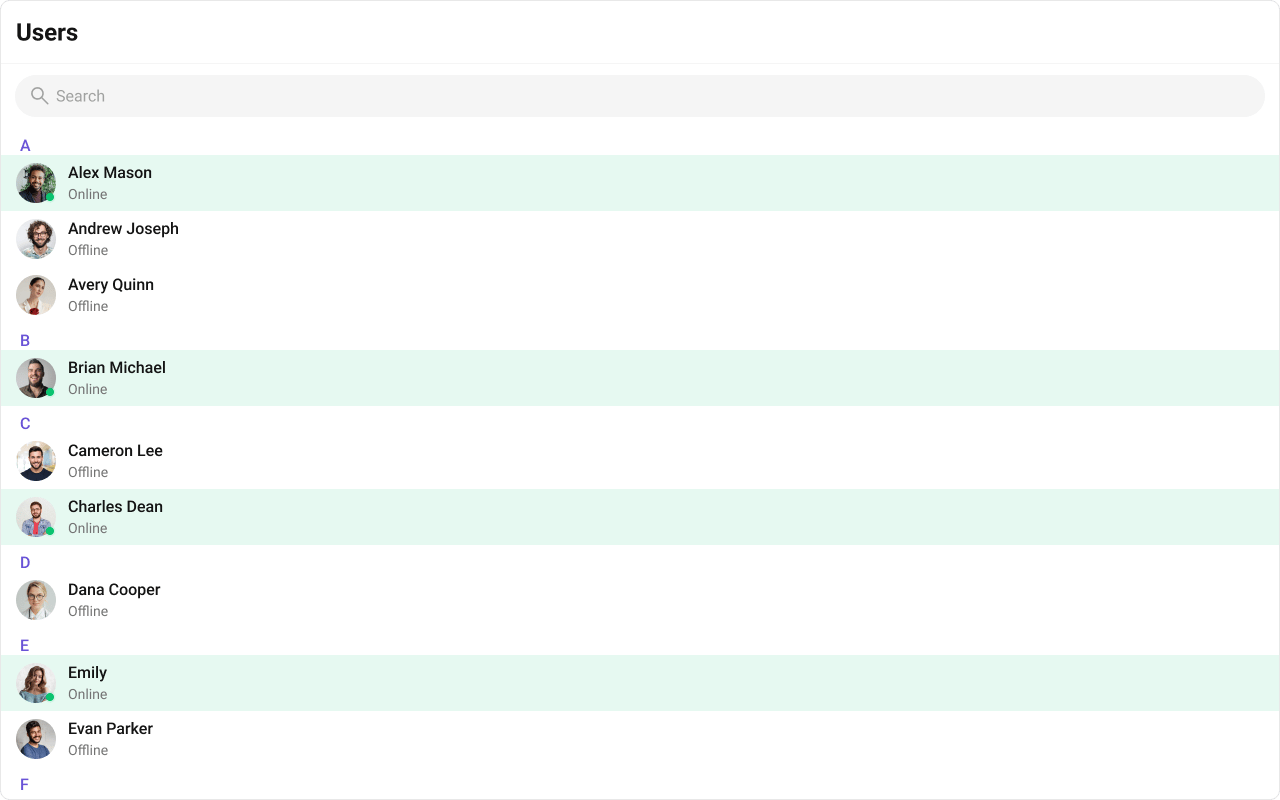
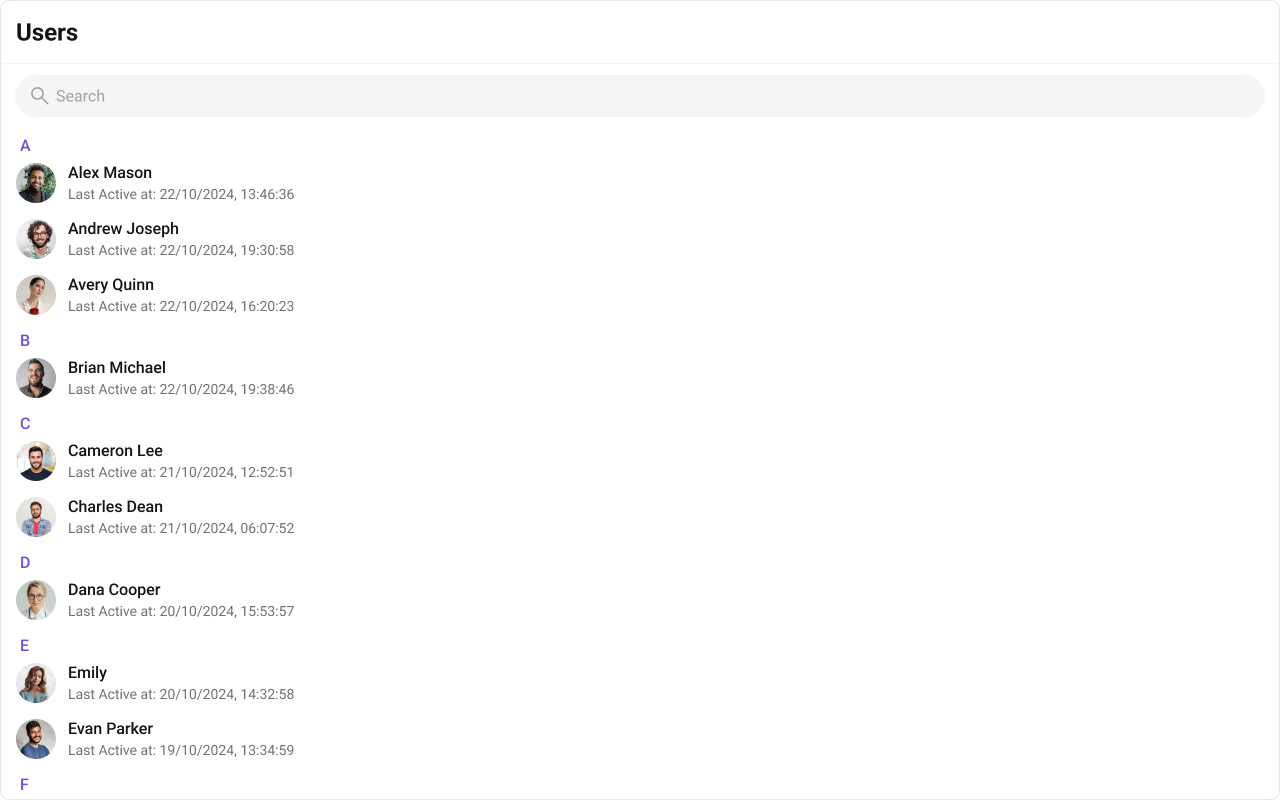
#### itemView

Replace the entire list item row.

Default:

<Frame>
  <img src="https://mintcdn.com/cometchat-22654f5b-feature-card-builder/qyfJptTKpJBV4TKk/images/8a79367f-users_listItemView_default_web_screens-701c604eb9c2d04dcaa8013fe409fcd9.png?fit=max&auto=format&n=qyfJptTKpJBV4TKk&q=85&s=fe657dfc637bfa4c42ac30c729828266" width="1280" height="800" data-path="images/8a79367f-users_listItemView_default_web_screens-701c604eb9c2d04dcaa8013fe409fcd9.png" />
</Frame>

Customized:

<Frame>
  <img src="https://mintcdn.com/cometchat-22654f5b-feature-card-builder/Sa9o3dFd0TJV05JN/images/3e262fef-users_listItemView_custom_web_screens-e5bb179fd08dc3089f3f6c8a608a62d3.png?fit=max&auto=format&n=Sa9o3dFd0TJV05JN&q=85&s=13a7a194cef93b33f89d50dd1d1c6bcd" width="1280" height="800" data-path="images/3e262fef-users_listItemView_custom_web_screens-e5bb179fd08dc3089f3f6c8a608a62d3.png" />
</Frame>

<Tabs>
  <Tab title="TypeScript">
    ```tsx theme={null}
    import { CometChat } from "@cometchat/chat-sdk-javascript";
    import { CometChatUsers } from "@cometchat/chat-uikit-react";

    function UsersDemo() {
      const getItemView = (user: CometChat.User) => {
        const status = user.getStatus();

        return (
          <div
            className={`cometchat-users__list-item cometchat-users__list-item-${status}
              ${status === "online" ? "cometchat-users__list-item-active" : ""}
              `}
          >
            <span>{user.getName()}</span>
            <span>{user.getStatus()}</span>
          </div>
        );
      };

      return <CometChatUsers itemView={getItemView} />;
    }
    ```
  </Tab>

  <Tab title="CSS">
    ```css theme={null}
    .cometchat-users__list-item {
      display: flex;
      align-items: center;
      gap: 8px;
      padding: 8px 16px;
    }

    .cometchat-users__list-item-active {
      background: rgba(9, 194, 111, 0.1);
    }
    ```
  </Tab>
</Tabs>

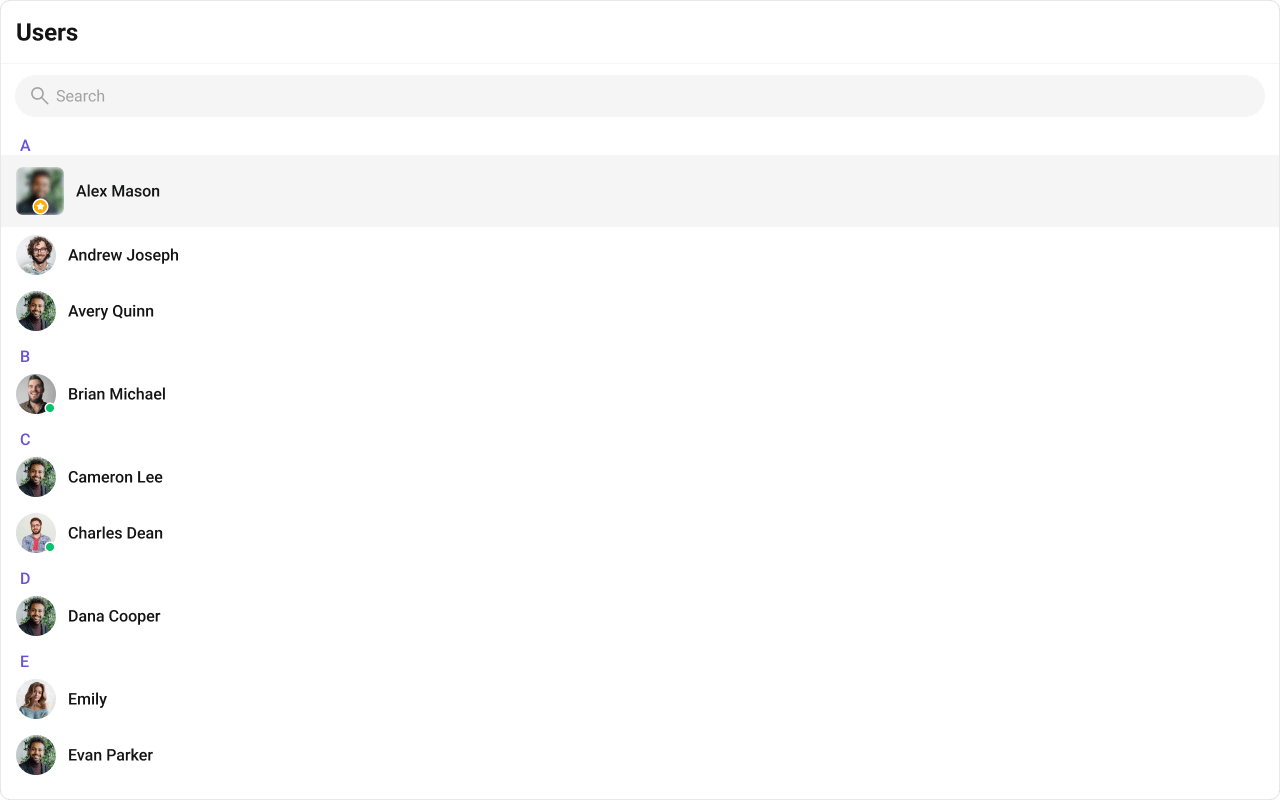
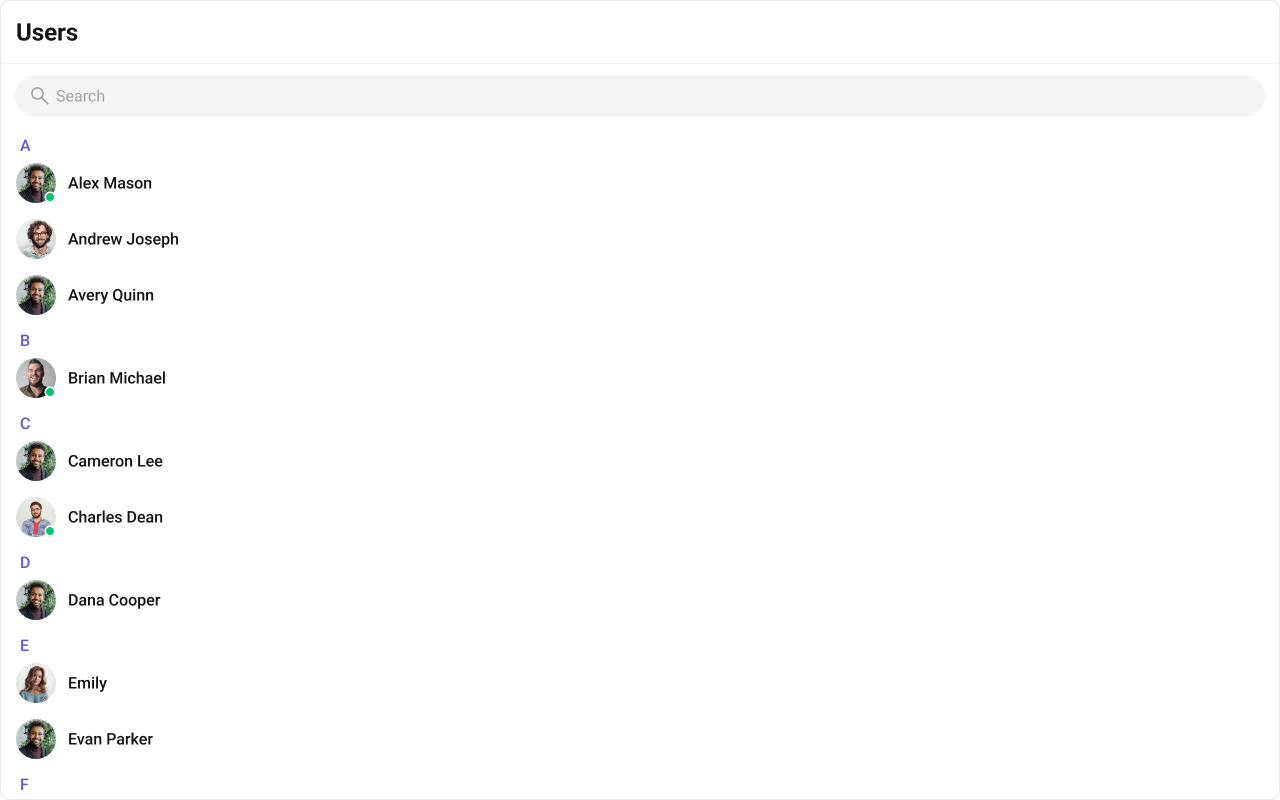
#### leadingView

Replace the avatar / left section.

<Frame>
  <img src="https://mintcdn.com/cometchat-22654f5b-feature-card-builder/wEJh-uJMkapAxmr_/images/f7433d40-users_leading_view-941e504d4acd9c4f23ccc7bc47d9f35e.png?fit=max&auto=format&n=wEJh-uJMkapAxmr_&q=85&s=0ccdafa537010ac84fbd4574a838d70a" width="1280" height="800" data-path="images/f7433d40-users_leading_view-941e504d4acd9c4f23ccc7bc47d9f35e.png" />
</Frame>

<Tabs>
  <Tab title="TypeScript">
    ```tsx theme={null}
    import { CometChat } from "@cometchat/chat-sdk-javascript";
    import { CometChatUsers, CometChatAvatar } from "@cometchat/chat-uikit-react";

    function LeadingViewUsers() {
      const getLeadingView = (user: CometChat.User) => {
        return (
          <div className="users__leading-view">
            <CometChatAvatar.Root image={user.getAvatar()} name={user.getName()}>
              <CometChatAvatar.Image />
              <CometChatAvatar.Initials />
            </CometChatAvatar.Root>
          </div>
        );
      };

      return <CometChatUsers leadingView={getLeadingView} />;
    }
    ```
  </Tab>

  <Tab title="CSS">
    ```css theme={null}
    .cometchat-users .users__leading-view .cometchat-avatar {
      border-radius: 8px;
      height: 48px;
      width: 48px;
    }

    .users__leading-view {
      position: relative;
    }
    ```
  </Tab>
</Tabs>

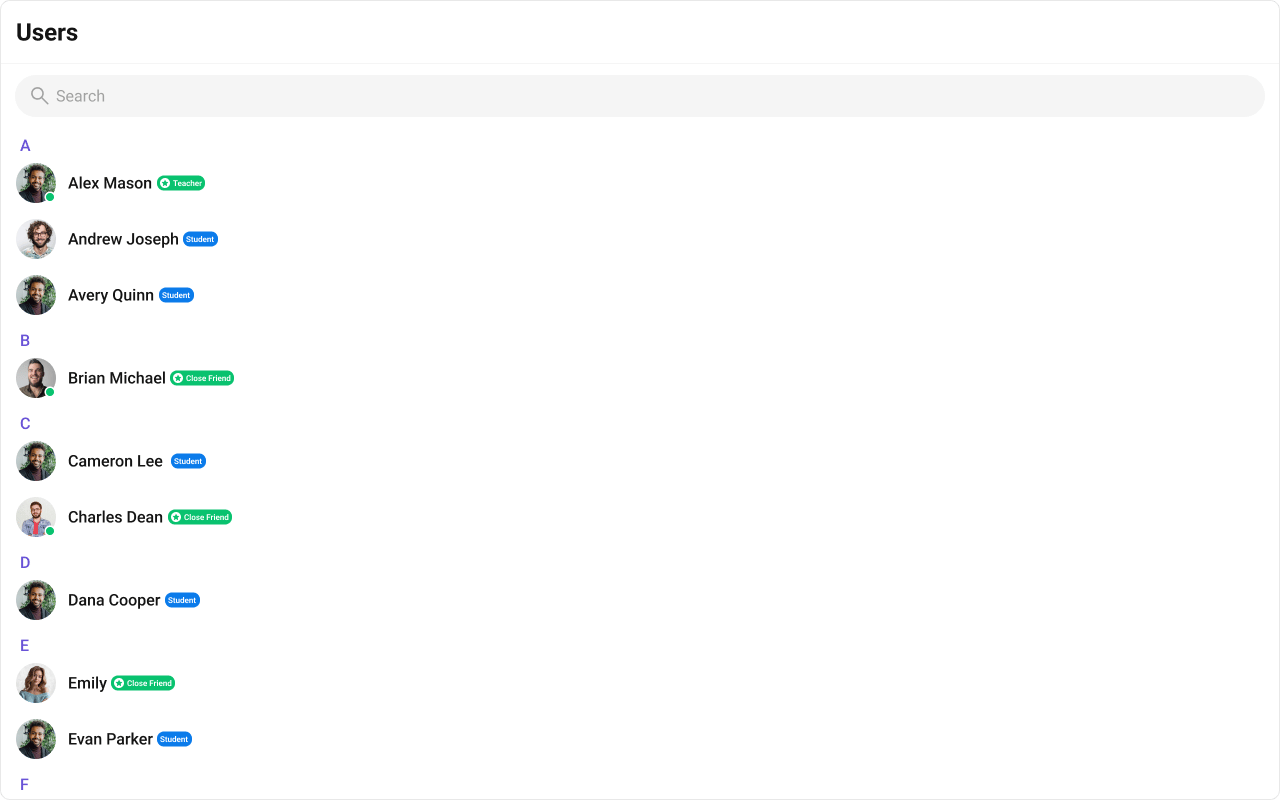
#### titleView

Replace the name / title text. Role badge inline example.

<Frame>
  <img src="https://mintcdn.com/cometchat-22654f5b-feature-card-builder/Vsd_l5VyiAINqcQj/images/77ffdb3f-users_title_view-7f900436f6b63a3e9d3434b6e6e7a1bc.png?fit=max&auto=format&n=Vsd_l5VyiAINqcQj&q=85&s=e4f89f52a813c38f36adc4305c3ca27d" width="1280" height="800" data-path="images/77ffdb3f-users_title_view-7f900436f6b63a3e9d3434b6e6e7a1bc.png" />
</Frame>

<Tabs>
  <Tab title="TypeScript">
    ```tsx theme={null}
    import { CometChat } from "@cometchat/chat-sdk-javascript";
    import { CometChatUsers } from "@cometchat/chat-uikit-react";

    function TitleViewUsers() {
      const getTitleView = (user: CometChat.User) => {
        return (
          <div className="users__title-view">
            <span className="users__title-view-name">{user.getName()}</span>
            <span className="users__title-view-type">{user.getRole()}</span>
          </div>
        );
      };

      return <CometChatUsers titleView={getTitleView} />;
    }
    ```
  </Tab>

  <Tab title="CSS">
    ```css theme={null}
    .users__title-view {
      display: flex;
      align-items: center;
      gap: 4px;
      align-self: stretch;
    }

    .users__title-view-name {
      overflow: hidden;
      color: #141414;
      text-overflow: ellipsis;
      font: 500 16px Roboto;
    }

    .users__title-view-type {
      color: #fff;
      font: 600 8px Roboto;
      display: flex;
      height: 15px;
      padding: 1px 3px;
      justify-content: center;
      align-items: center;
      border-radius: 7px;
      background: #09c26f;
    }
    ```
  </Tab>
</Tabs>

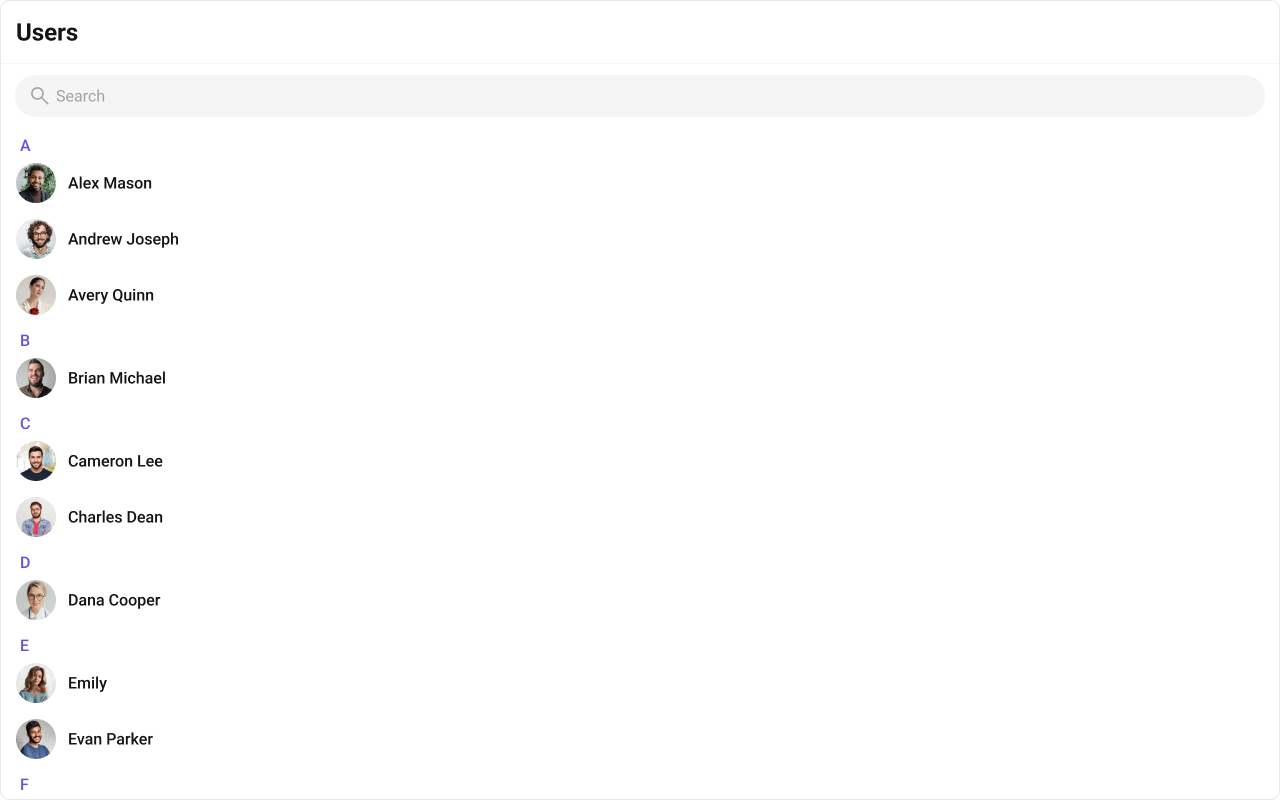
#### subtitleView

Replace the subtitle text for each user.

Default:

<Frame>
  <img src="https://mintcdn.com/cometchat-22654f5b-feature-card-builder/tKDtB3xjE6jATqmt/images/03a38d40-users_subtitleView_default_web_screens-47bbbf7864a0f4c75fd99548ba54240e.png?fit=max&auto=format&n=tKDtB3xjE6jATqmt&q=85&s=0b949584d664f8e160586ccfcfd7c931" width="1280" height="800" data-path="images/03a38d40-users_subtitleView_default_web_screens-47bbbf7864a0f4c75fd99548ba54240e.png" />
</Frame>

Customized:

<Frame>
  <img src="https://mintcdn.com/cometchat-22654f5b-feature-card-builder/BeS0cj3AlwGwbqBl/images/aa816f8e-users_subtitleView_custom_web_screens-d71b9197c2c12c7d4639c5cf917d1f20.png?fit=max&auto=format&n=BeS0cj3AlwGwbqBl&q=85&s=c9ab0ea57d45bbcf16b9154333575dea" width="1280" height="800" data-path="images/aa816f8e-users_subtitleView_custom_web_screens-d71b9197c2c12c7d4639c5cf917d1f20.png" />
</Frame>

<Tabs>
  <Tab title="TypeScript">
    ```tsx theme={null}
    import { CometChat } from "@cometchat/chat-sdk-javascript";
    import { CometChatUsers } from "@cometchat/chat-uikit-react";

    function SubtitleViewUsers() {
      const getSubtitleView = (user: CometChat.User) => {
        return (
          <div className="users-subtitle">
            {user.getStatusMessage() || user.getStatus()}
          </div>
        );
      };

      return <CometChatUsers subtitleView={getSubtitleView} />;
    }
    ```
  </Tab>

  <Tab title="CSS">
    ```css theme={null}
    .users-subtitle {
      overflow: hidden;
      color: #727272;
      text-overflow: ellipsis;
      white-space: nowrap;
      font: 400 14px Roboto;
    }
    ```
  </Tab>
</Tabs>

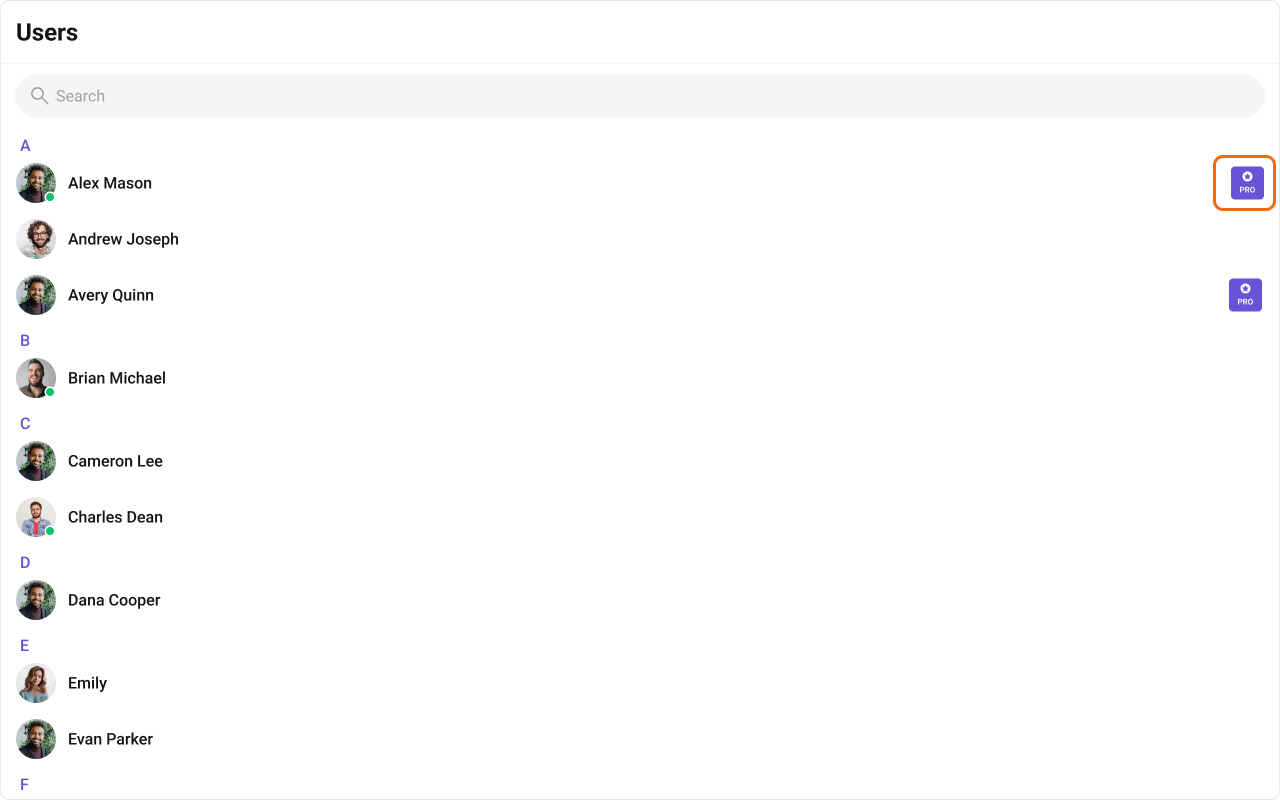
#### trailingView

Replace the right section.

<Frame>
  <img src="https://mintcdn.com/cometchat-22654f5b-feature-card-builder/U1KbQ0VSXjjiH44y/images/58d37616-users_trailing_view-3e754b1f9546412d2ab768abe6bbe8aa.png?fit=max&auto=format&n=U1KbQ0VSXjjiH44y&q=85&s=b0a2d6b1818e2aba3ffd0df87eca5438" width="1280" height="800" data-path="images/58d37616-users_trailing_view-3e754b1f9546412d2ab768abe6bbe8aa.png" />
</Frame>

<Tabs>
  <Tab title="TypeScript">
    ```tsx theme={null}
    import { CometChat } from "@cometchat/chat-sdk-javascript";
    import { CometChatUsers } from "@cometchat/chat-uikit-react";

    function TrailingViewUsers() {
      const getTrailingView = (user: CometChat.User) => {
        const tag = user.getTags()?.[0] ?? "";
        return (
          <div className="users__trailing-view">
            <span className="users__trailing-view-text">{tag}</span>
          </div>
        );
      };

      return <CometChatUsers trailingView={getTrailingView} />;
    }
    ```
  </Tab>

  <Tab title="CSS">
    ```css theme={null}
    .users__trailing-view {
      display: flex;
      width: 33px;
      padding: 5px 3px;
      flex-direction: column;
      justify-content: center;
      align-items: center;
      gap: 3px;
      border-radius: 4px;
      background: #6852d6;
    }

    .users__trailing-view-text {
      font: 600 8px Inter;
      color: white;
    }
    ```
  </Tab>
</Tabs>

### Compound Composition

For full layout control, use sub-components. Omit any sub-component to hide it:

```tsx theme={null}
<CometChatUsers.Root onItemClick={handleClick}>
  {/* No Header or SearchBar — they won't render */}
  <CometChatUsers.List />
</CometChatUsers.Root>
```

Available sub-components:

| Sub-component     | Description                    | Props                                                      | Flat API equivalent |
| ----------------- | ------------------------------ | ---------------------------------------------------------- | ------------------- |
| `Root`            | Context provider and container | All Root props + `children`                                | —                   |
| `List`            | Scrollable user list           | `itemView`                                                 | `itemView`          |
| `Item`            | Individual user row            | `leadingView`, `titleView`, `subtitleView`, `trailingView` | Per-item view props |
| `Header`          | Header area                    | `title`, `children`                                        | `headerView`        |
| `SearchBar`       | Search input                   | `placeholder`                                              | —                   |
| `SectionHeader`   | Alphabetical section header    | `letter`                                                   | —                   |
| `EmptyState`      | Empty state                    | `children`                                                 | `emptyView`         |
| `ErrorState`      | Error state                    | `children`                                                 | `errorView`         |
| `LoadingState`    | Loading shimmer                | `children`                                                 | `loadingView`       |
| `SelectedPreview` | Selected users chip bar        | `chipView`                                                 | —                   |

### CSS Styling

Override design tokens on the component selector:

```css theme={null}
.cometchat-users {
  --cometchat-background-color-01: #1a1a2e;
  --cometchat-text-color-primary: #ffffff;
}

.cometchat-users__item--active {
  background: var(--cometchat-primary-color);
}
```

***

## Props

All props are optional.

<Note>
  View slot props (`headerView`, `loadingView`, `emptyView`, `errorView`, `itemView`, `leadingView`, `titleView`, `subtitleView`, `trailingView`) are convenience props available only on the flat API. The search input is the `SearchBar` sub-component (with a `placeholder` prop), not a view slot. In compound composition mode, use the corresponding sub-components directly.
</Note>

***

### usersRequestBuilder

Custom request builder for fetching users. Controls pagination, filtering, and sorting.

|         |                                 |
| ------- | ------------------------------- |
| Type    | `CometChat.UsersRequestBuilder` |
| Default | SDK default (limit 30)          |

***

### searchRequestBuilder

Custom request builder used specifically when the user searches. Separate from the main builder.

|         |                                 |
| ------- | ------------------------------- |
| Type    | `CometChat.UsersRequestBuilder` |
| Default | `undefined`                     |

***

### searchKeyword

Initial search keyword to pre-filter users on mount.

|         |             |
| ------- | ----------- |
| Type    | `string`    |
| Default | `undefined` |

***

### hideUserStatus

Hide the online/offline status indicator on user avatars.

|         |           |
| ------- | --------- |
| Type    | `boolean` |
| Default | `false`   |

***

### hideSearch

Hide the search bar entirely.

|         |           |
| ------- | --------- |
| Type    | `boolean` |
| Default | `false`   |

***

### showSectionHeader

Show alphabetical section headers (A, B, C…) in the user list.

|         |           |
| ------- | --------- |
| Type    | `boolean` |
| Default | `true`    |

***

### showSelectedUsersPreview

Show a preview strip of selected user chips above the list (useful in multi-select mode).

|         |           |
| ------- | --------- |
| Type    | `boolean` |
| Default | `false`   |

***

### showScrollbar

Show the native scrollbar on the user list.

|         |           |
| ------- | --------- |
| Type    | `boolean` |
| Default | `false`   |

***

### selectionMode

Enable selection mode for single or multi-select operations.

|         |                                    |
| ------- | ---------------------------------- |
| Type    | `'none' \| 'single' \| 'multiple'` |
| Default | `'none'`                           |

***

### activeUser

The currently active/highlighted user. The matching item receives an active visual state.

|         |                  |
| ------- | ---------------- |
| Type    | `CometChat.User` |
| Default | `undefined`      |

***

### sectionHeaderKey

The property of `CometChat.User` used to group users into sections (e.g., first letter of name).

|         |                        |
| ------- | ---------------------- |
| Type    | `keyof CometChat.User` |
| Default | `undefined`            |

***

### options

Function that returns context menu options for each user item (shown on hover/swipe).

|         |                                                   |
| ------- | ------------------------------------------------- |
| Type    | `(user: CometChat.User) => CometChatUserOption[]` |
| Default | `undefined`                                       |

```tsx theme={null}
<CometChatUsers
  options={(user) => [
    {
      id: "block",
      title: "Block User",
      iconURL: blockIcon,
      onClick: (u) => blockUser(u),
    },
    {
      id: "info",
      title: "View Profile",
      iconURL: infoIcon,
      onClick: (u) => openProfile(u),
    },
  ]}
/>
```

***

### onItemClick

Callback when a user item is clicked.

|         |                                  |
| ------- | -------------------------------- |
| Type    | `(user: CometChat.User) => void` |
| Default | `undefined`                      |

***

### onSelect

Callback when a user is selected or deselected (only fires in selection mode).

|         |                                                     |
| ------- | --------------------------------------------------- |
| Type    | `(user: CometChat.User, selected: boolean) => void` |
| Default | `undefined`                                         |

***

### onError

Callback when an SDK error occurs during fetch or real-time operations.

|         |                                                           |
| ------- | --------------------------------------------------------- |
| Type    | `((error: CometChat.CometChatException) => void) \| null` |
| Default | `null`                                                    |

***

### onEmpty

Callback when the user list is empty after the initial fetch completes.

|         |              |
| ------- | ------------ |
| Type    | `() => void` |
| Default | `undefined`  |

***

## CSS Selectors

| Target         | Selector                           |
| -------------- | ---------------------------------- |
| Root container | `.cometchat-users`                 |
| Header         | `.cometchat-users__header`         |
| Search bar     | `.cometchat-users__search-bar`     |
| List container | `.cometchat-users__list`           |
| User item      | `.cometchat-users__item`           |
| Active item    | `.cometchat-users__item--active`   |
| Section header | `.cometchat-users__section-header` |
| Empty state    | `.cometchat-users__empty-state`    |
| Error state    | `.cometchat-users__error-state`    |
| Loading state  | `.cometchat-users__loading-state`  |

***

## Next Steps

<CardGroup cols={2}>
  <Card title="Conversations" icon="comments" href="/ui-kit/react/components/conversations">
    View recent conversations for the logged-in user
  </Card>

  <Card title="Groups" icon="users" href="/ui-kit/react/components/groups">
    Browse and join groups
  </Card>

  <Card title="Message List" icon="comment-dots" href="/ui-kit/react/components/message-list">
    Display messages for the selected user
  </Card>

  <Card title="Theming" icon="paintbrush" href="/ui-kit/react/theming">
    Customize colors, fonts, and spacing
  </Card>
</CardGroup>