> ## Documentation Index
> Fetch the complete documentation index at: https://cometchat-22654f5b-feature-card-builder.mintlify.site/llms.txt
> Use this file to discover all available pages before exploring further.
# Introduction
> Customize CometChat Android UI Kit themes with colors, typography, spacing, component styles, branding, and light or dark mode.
| Field | Value |
| ------------------- | ---------------------------------------------------------------------------------------------------------------------------------------------------------------------------- |
| Goal | Customize UI Kit appearance (colors, fonts, dark mode) via Android XML theme attributes |
| Where | `app/src/main/res/values/themes.xml` (global) — applied via `android:theme` in `AndroidManifest.xml` |
| Step 1 | Create an app theme extending `CometChatTheme.DayNight` |
| Step 2 | Override theme attributes (`cometchatPrimaryColor`, `cometchatBackgroundColor1`, etc.) in your theme |
| Step 3 (dark mode) | Create `app/src/main/res/values-night/themes.xml` and override attributes for dark mode |
| Key attributes | `cometchatPrimaryColor`, `cometchatBackgroundColor1`, `cometchatBackgroundColor2`, `cometchatTextColorPrimary`, `cometchatTextColorSecondary`, `cometchatStrokeColorDefault` |
| Constraints | Must extend `CometChatTheme.DayNight` as parent theme; activity-level overrides beat application-level |
| Full attribute list | [Theme attributes on GitHub](https://github.com/cometchat/cometchat-uikit-android/blob/v5/chatuikit/src/main/res/values/attr_cometchat_theme.xml) |
Create and apply a global CometChat UI Kit theme that matches your brand across light and dark modes.
## When to use this
* You want a single UI Kit theme that matches your app branding.
* You need light and dark mode support with consistent colors.
* You want to customize primary, background, or text colors across UI Kit.
* You want a different UI Kit theme for a specific activity.
## Prerequisites
* CometChat UI Kit for Android is installed and initialized.
* You can edit `app/src/main/res/values/themes.xml`.
* You can edit `AndroidManifest.xml`.
* Optional: You can create `app/src/main/res/values-night/themes.xml` for dark mode overrides.
## Quick start
File: `app/src/main/res/values/themes.xml`. Extend `CometChatTheme.DayNight` as the base theme.
File: `AndroidManifest.xml`. Set `android:theme` on the `` element.
File: `AndroidManifest.xml`. Set `android:theme` on a specific `` if needed.
File: `app/src/main/res/values/themes.xml`. Update `cometchatPrimaryColor` and other attributes.
File: `app/src/main/res/values-night/themes.xml`. Override attributes for dark mode.
Run the app and confirm UI Kit screens use your colors in light and dark mode.
## Core concepts
* `CometChatTheme.DayNight`: Base UI Kit theme built on `Theme.MaterialComponents.DayNight.NoActionBar`.
* Theme attributes: `cometchatPrimaryColor`, `cometchatBackgroundColor1`, `cometchatTextColorPrimary`, and others.
* `values-night`: Android resource folder for dark mode overrides.
***
## Theming Contract
**Inputs**
* Base theme: `CometChatTheme.DayNight` as the parent of your app theme
* Global theme attributes in `app/src/main/res/values/themes.xml`
* Activity-scoped theme via `android:theme` on a specific `` in `AndroidManifest.xml`
* Optional dark mode overrides in `app/src/main/res/values-night/themes.xml`
**Precedence**
1. Activity-level theme (most specific)
2. Application-level theme (`android:theme` on ``)
3. `CometChatTheme.DayNight` defaults (least specific)
**Outputs**
* `cometchatPrimaryColor` changes buttons, highlights, and interactive elements
* `cometchatBackgroundColor1` / `cometchatBackgroundColor2` change panel and surface backgrounds
* `cometchatTextColorPrimary` / `cometchatTextColorSecondary` change text across the UI
* `cometchatStrokeColorDefault` changes borders and dividers
* Dark mode values from `values-night` apply automatically when the system uses night mode
***
## Implementation
### Create an app theme that extends `CometChatTheme.DayNight`
What you're changing: The base theme used by UI Kit components.
* **Where to change it**: `app/src/main/res/values/themes.xml`.
* **Applies to**: All UI Kit components.
* **Default behavior**: UI Kit uses `CometChatTheme.DayNight`.
* **Override**: Define your app theme and set `parent="CometChatTheme.DayNight"`.
* **Code**:
```xml themes.xml lines theme={null}
```
* **What this does**: Creates an app theme that inherits all UI Kit styling.
* **Verify**: UI Kit screens render correctly after the theme is applied.
### Apply the theme to your application
What you're changing: The theme applied to the entire app.
* **Where to change it**: `AndroidManifest.xml`.
* **Applies to**: All activities unless overridden.
* **Default behavior**: The application theme is not set to your UI Kit theme.
* **Override**: Set `android:theme` on the `` element.
* **Code**:
```xml AndroidManifest.xml lines theme={null}
```
* **What this does**: Applies `AppTheme` to every activity by default.
* **Verify**: Launch any UI Kit screen and confirm the theme is applied.
 ### Apply a theme to a specific activity
What you're changing: The theme for a single activity.
* **Where to change it**: `AndroidManifest.xml`.
* **Applies to**: Only the targeted activity.
* **Default behavior**: Activities inherit the application theme.
* **Override**: Set `android:theme` on the `` element.
* **Code**:
```xml AndroidManifest.xml lines theme={null}
```
* **What this does**: Applies `ChatTheme` only to `ChatActivity`.
* **Verify**: Open `ChatActivity` and confirm the theme differs from the rest of the app.
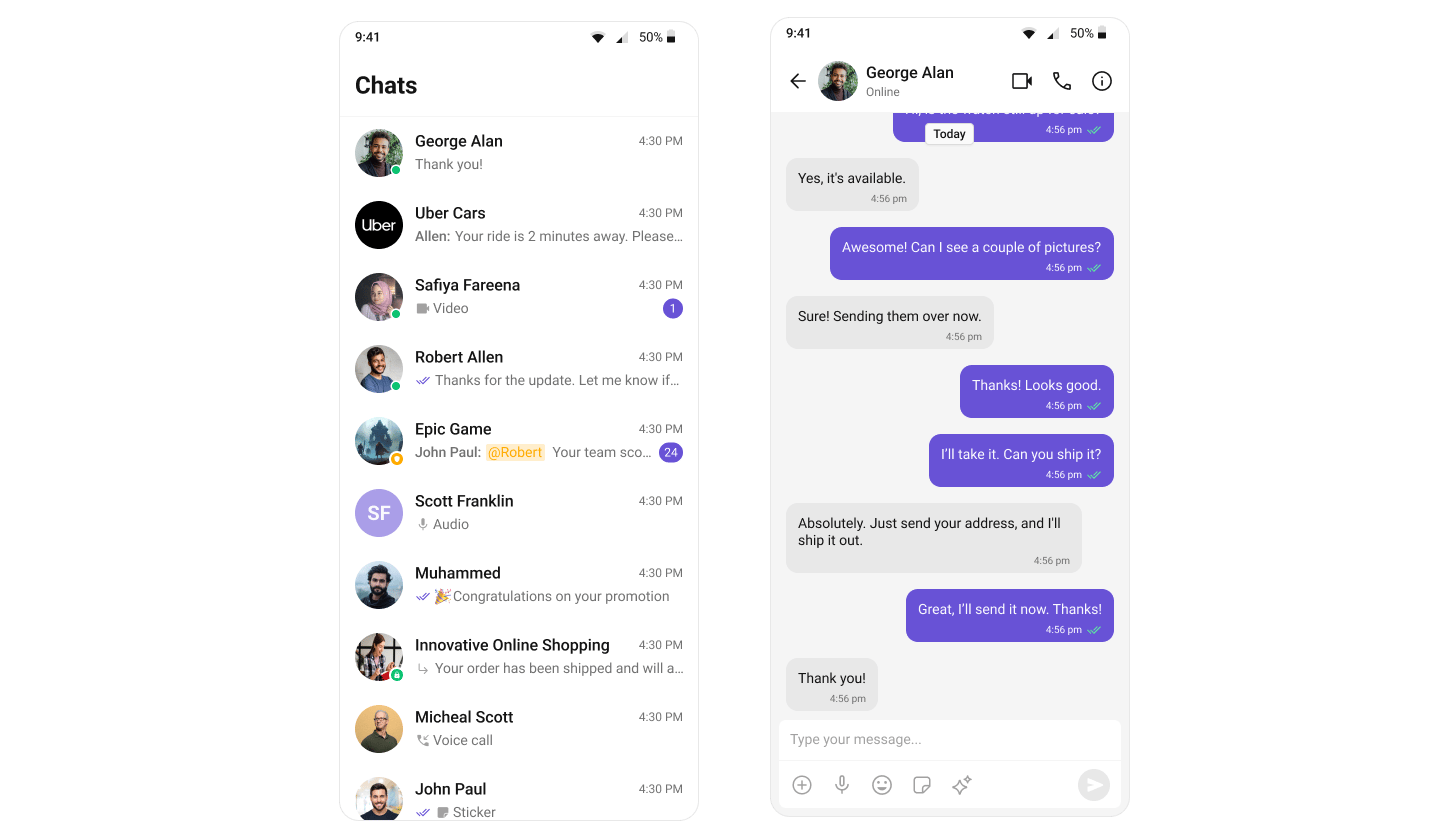
### Change the primary color
What you're changing: The primary brand color used across UI Kit.
* **Where to change it**: `app/src/main/res/values/themes.xml`.
* **Applies to**: Buttons, highlights, and interactive elements.
* **Default behavior**: UI Kit uses the default primary color.
* **Override**: Set `cometchatPrimaryColor` in your theme.
* **Code**:
```xml themes.xml lines theme={null}
```
* **What this does**: Replaces the UI Kit primary color with your brand color.
* **Verify**: Buttons and highlights use the new color.
### Apply a theme to a specific activity
What you're changing: The theme for a single activity.
* **Where to change it**: `AndroidManifest.xml`.
* **Applies to**: Only the targeted activity.
* **Default behavior**: Activities inherit the application theme.
* **Override**: Set `android:theme` on the `` element.
* **Code**:
```xml AndroidManifest.xml lines theme={null}
```
* **What this does**: Applies `ChatTheme` only to `ChatActivity`.
* **Verify**: Open `ChatActivity` and confirm the theme differs from the rest of the app.
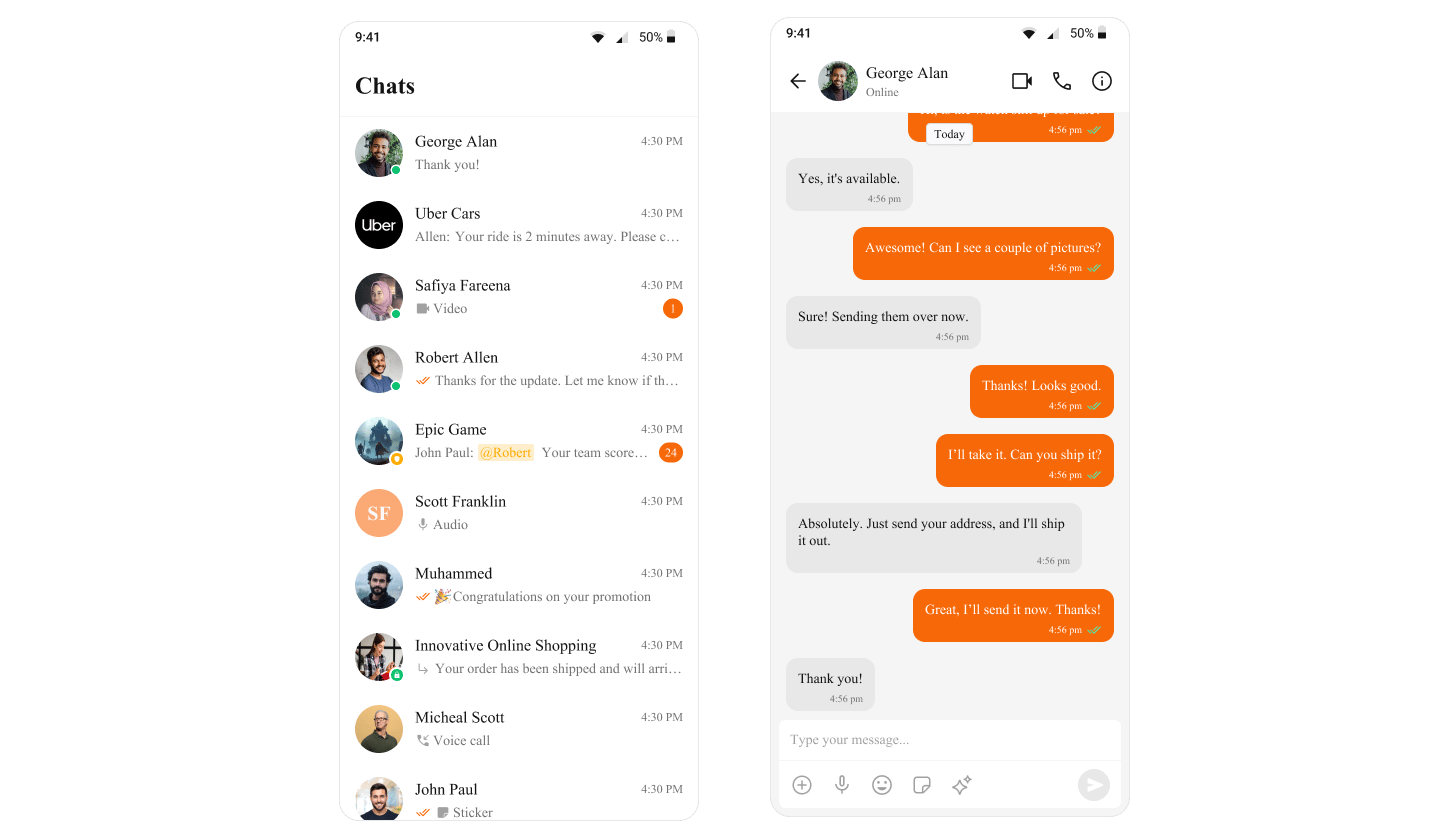
### Change the primary color
What you're changing: The primary brand color used across UI Kit.
* **Where to change it**: `app/src/main/res/values/themes.xml`.
* **Applies to**: Buttons, highlights, and interactive elements.
* **Default behavior**: UI Kit uses the default primary color.
* **Override**: Set `cometchatPrimaryColor` in your theme.
* **Code**:
```xml themes.xml lines theme={null}
```
* **What this does**: Replaces the UI Kit primary color with your brand color.
* **Verify**: Buttons and highlights use the new color.
 ### Customize common theme attributes
What you're changing: Background, text, and stroke colors.
* **Where to change it**: `app/src/main/res/values/themes.xml`.
* **Applies to**: All UI Kit components that use these attributes.
* **Default behavior**: UI Kit uses its default theme values.
* **Override**: Define the attributes in your app theme.
* **Code**:
```xml themes.xml lines theme={null}
```
* **What this does**: Updates common UI Kit colors in one place.
* **Verify**: Backgrounds, text, and dividers reflect the new values.
### Add dark mode overrides
What you're changing: Theme values used in dark mode.
* **Where to change it**: `app/src/main/res/values-night/themes.xml`.
* **Applies to**: Dark mode only.
* **Default behavior**: Dark mode uses the same values as light mode.
* **Override**: Create `values-night/themes.xml` and override the attributes.
* **Code**:
```xml values-night/themes.xml lines theme={null}
```
* **What this does**: Applies dark mode colors when the system uses night mode.
* **Verify**: Toggle dark mode on the device and confirm UI Kit colors update.
For a complete list of theme attributes, visit the [theme attributes file](https://github.com/cometchat/cometchat-uikit-android/blob/v5/chatuikit/src/main/res/values/attr_cometchat_theme.xml) on GitHub.
## Customization matrix
| What you want to change | Where | Property/API | Example |
| ---------------------------- | ------------------------------------------ | ---------------------------------- | ---------------------------------------------------------- |
| Base UI Kit theme | `app/src/main/res/values/themes.xml` | `parent="CometChatTheme.DayNight"` | `
### Customize common theme attributes
What you're changing: Background, text, and stroke colors.
* **Where to change it**: `app/src/main/res/values/themes.xml`.
* **Applies to**: All UI Kit components that use these attributes.
* **Default behavior**: UI Kit uses its default theme values.
* **Override**: Define the attributes in your app theme.
* **Code**:
```xml themes.xml lines theme={null}
```
* **What this does**: Updates common UI Kit colors in one place.
* **Verify**: Backgrounds, text, and dividers reflect the new values.
### Add dark mode overrides
What you're changing: Theme values used in dark mode.
* **Where to change it**: `app/src/main/res/values-night/themes.xml`.
* **Applies to**: Dark mode only.
* **Default behavior**: Dark mode uses the same values as light mode.
* **Override**: Create `values-night/themes.xml` and override the attributes.
* **Code**:
```xml values-night/themes.xml lines theme={null}
```
* **What this does**: Applies dark mode colors when the system uses night mode.
* **Verify**: Toggle dark mode on the device and confirm UI Kit colors update.
For a complete list of theme attributes, visit the [theme attributes file](https://github.com/cometchat/cometchat-uikit-android/blob/v5/chatuikit/src/main/res/values/attr_cometchat_theme.xml) on GitHub.
## Customization matrix
| What you want to change | Where | Property/API | Example |
| ---------------------------- | ------------------------------------------ | ---------------------------------- | ---------------------------------------------------------- |
| Base UI Kit theme | `app/src/main/res/values/themes.xml` | `parent="CometChatTheme.DayNight"` | `