> ## Documentation Index
> Fetch the complete documentation index at: https://cometchat-22654f5b-feature-card-builder.mintlify.site/llms.txt
> Use this file to discover all available pages before exploring further.
# Message Composer
> Message input area with send, attachment, voice note, sticker, and AI buttons. Supports text, media, mentions, and message editing.
```json theme={null}
{
"component": "CometChatMessageComposer",
"package": "com.cometchat.chatuikit.messagecomposer",
"xmlElement": "",
"description": "Message input area with send, attachment, voice note, sticker, and AI buttons. Supports text, media, mentions, and message editing.",
"primaryOutput": {
"method": "setOnSendButtonClick",
"type": "SendButtonClick"
},
"methods": {
"data": {
"setUser": {
"type": "User",
"default": "null",
"note": "Sets the target user for one-on-one conversations"
},
"setGroup": {
"type": "Group",
"default": "null",
"note": "Sets the target group for group conversations"
}
},
"callbacks": {
"setOnSendButtonClick": "SendButtonClick — void onClick(Context context, BaseMessage message)",
"setOnError": "OnError",
"setOnTextChangedListener": "CometChatTextWatcher"
},
"visibility": {
"setAttachmentButtonVisibility": { "type": "int (View.VISIBLE | View.GONE)", "default": "View.VISIBLE" },
"setVoiceNoteButtonVisibility": { "type": "int", "default": "View.VISIBLE" },
"setSendButtonVisibility": { "type": "int", "default": "View.VISIBLE" },
"setStickersButtonVisibility": { "type": "int", "default": "View.VISIBLE" },
"setAuxiliaryButtonVisibility": { "type": "int", "default": "View.VISIBLE" },
"setImageAttachmentOptionVisibility": { "type": "int", "default": "View.VISIBLE" },
"setCameraAttachmentOptionVisibility": { "type": "int", "default": "View.VISIBLE" },
"setVideoAttachmentOptionVisibility": { "type": "int", "default": "View.VISIBLE" },
"setAudioAttachmentOptionVisibility": { "type": "int", "default": "View.VISIBLE" },
"setFileAttachmentOptionVisibility": { "type": "int", "default": "View.VISIBLE" },
"setPollAttachmentOptionVisibility": { "type": "int", "default": "View.VISIBLE" },
"setCollaborativeDocumentOptionVisibility": { "type": "int", "default": "View.VISIBLE" },
"setCollaborativeWhiteboardOptionVisibility": { "type": "int", "default": "View.VISIBLE" }
},
"viewSlots": {
"setHeaderView": "View — custom view above the text input area",
"setFooterView": "View — custom view below the text input area",
"setSendButtonView": "View — replaces the default send button",
"setAuxiliaryButtonView": "View — replaces the auxiliary button area (stickers, AI)",
"setAttachmentOptions": "List — replaces default attachment options",
"setAIOptions": "Function4> — replaces AI options",
"setTextFormatters": "List — custom text formatters (mentions, etc.)",
"setSuggestionListItemView": "SuggestionListViewHolderListener — custom suggestion list item"
},
"advanced": {
"setParentMessageId": "long — sets the parent message ID for threaded replies",
"setInitialComposerText": "String — sets predefined text in the input field",
"getText": "String — returns the current raw text",
"getProcessedText": "String — returns text with formatting applied",
"getComposerViewModel": "MessageComposerViewModel — internal ViewModel access",
"getMessageInput": "CometChatMessageInput — internal message input access",
"getView": "LinearLayout — root view access"
},
"style": {
"setStyle": {
"type": "@StyleRes int",
"parent": "CometChatMessageComposerStyle"
}
}
},
"events": [],
"sdkListeners": []
}
```
## Where It Fits
`CometChatMessageComposer` is an input component. It renders the message input area and sends messages to the active conversation. Wire it with `CometChatMessageHeader` and `CometChatMessageList` to build a complete messaging layout.
```kotlin ChatActivity.kt lines theme={null}
class ChatActivity : AppCompatActivity() {
private lateinit var messageHeader: CometChatMessageHeader
private lateinit var messageList: CometChatMessageList
private lateinit var messageComposer: CometChatMessageComposer
override fun onCreate(savedInstanceState: Bundle?) {
super.onCreate(savedInstanceState)
setContentView(R.layout.activity_chat)
messageHeader = findViewById(R.id.message_header)
messageList = findViewById(R.id.message_list)
messageComposer = findViewById(R.id.message_composer)
// Set the user on all three components
messageHeader.setUser(user)
messageList.setUser(user)
messageComposer.setUser(user)
}
}
```
```java ChatActivity.java lines theme={null}
public class ChatActivity extends AppCompatActivity {
private CometChatMessageHeader messageHeader;
private CometChatMessageList messageList;
private CometChatMessageComposer messageComposer;
@Override
protected void onCreate(Bundle savedInstanceState) {
super.onCreate(savedInstanceState);
setContentView(R.layout.activity_chat);
messageHeader = findViewById(R.id.message_header);
messageList = findViewById(R.id.message_list);
messageComposer = findViewById(R.id.message_composer);
// Set the user on all three components
messageHeader.setUser(user);
messageList.setUser(user);
messageComposer.setUser(user);
}
}
```
## Quick Start
Add the component to your layout XML:
```xml layout_activity.xml lines theme={null}
```
 Prerequisites: CometChat SDK initialized with `CometChatUIKit.init()`, a user logged in, and the `cometchat-chat-uikit-android` dependency added.
The MessageComposer is responsible for managing runtime permissions. To ensure the **ActivityResultLauncher** is properly initialized, its object should be created in the **onCreate** state of an activity. To ensure that the composer is loaded within the fragment, it is important to make sure that the fragment is loaded in the `onCreate` state of the activity.
To add programmatically in an Activity:
```kotlin YourActivity.kt lines theme={null}
override fun onCreate(savedInstanceState: Bundle?) {
super.onCreate(savedInstanceState)
val composer = CometChatMessageComposer(this)
composer.setUser(user)
setContentView(composer)
}
```
```java YourActivity.java lines theme={null}
@Override
protected void onCreate(Bundle savedInstanceState) {
super.onCreate(savedInstanceState);
CometChatMessageComposer composer = new CometChatMessageComposer(this);
composer.setUser(user);
setContentView(composer);
}
```
Or in a Fragment:
```kotlin YourFragment.kt lines theme={null}
override fun onCreateView(inflater: LayoutInflater, container: ViewGroup?, savedInstanceState: Bundle?): View {
val composer = CometChatMessageComposer(requireContext())
composer.setUser(user)
return composer
}
```
```java YourFragment.java lines theme={null}
@Override
public View onCreateView(LayoutInflater inflater, ViewGroup container, Bundle savedInstanceState) {
CometChatMessageComposer composer = new CometChatMessageComposer(getContext());
composer.setUser(user);
return composer;
}
```
## Actions and Events
### Callback Methods
#### `setOnSendButtonClick`
Fires when the send button is tapped. Primary hook — override to intercept or replace the default message-sending logic.
```kotlin YourActivity.kt lines theme={null}
messageComposer.setOnSendButtonClick(object : CometChatMessageComposer.SendButtonClick {
override fun onClick(context: Context, baseMessage: BaseMessage) {
Toast.makeText(context, "OnSendButtonClicked ..", Toast.LENGTH_SHORT).show()
}
})
```
```java YourActivity.java lines theme={null}
messageComposer.setOnSendButtonClick(new CometChatMessageComposer.SendButtonClick() {
@Override
public void onClick(Context context, BaseMessage baseMessage) {
Toast.makeText(context, "OnSendButtonClicked ..", Toast.LENGTH_SHORT).show();
}
});
```
> **What this does:** Replaces the default send-button behavior. When a user taps the send button, your custom lambda executes instead of the built-in message sending logic.
#### `setOnError`
Fires on internal errors (network failure, auth issue, SDK exception).
```kotlin YourActivity.kt lines theme={null}
messageComposer.setOnError(object : OnError {
override fun onError(context: Context, e: CometChatException) {
// Your Exception Handling code.
}
})
```
```java YourActivity.java lines theme={null}
messageComposer.setOnError(new OnError() {
@Override
public void onError(Context context, CometChatException e) {
//Your Exception Handling code.
}
});
```
> **What this does:** Registers an error listener. If the component encounters an error, your callback receives the `CometChatException`.
#### `setOnTextChangedListener`
Fires whenever the message input's text value changes, enabling dynamic text handling.
```kotlin YourActivity.kt lines theme={null}
messageComposer.setOnTextChangedListener(object : CometChatTextWatcher() {
override fun onTextChanged(charSequence: CharSequence, start: Int, before: Int, count: Int) {
}
override fun beforeTextChanged(s: CharSequence, start: Int, count: Int, after: Int) {
}
override fun afterTextChanged(editable: Editable) {
}
})
```
```java YourActivity.java lines theme={null}
messageComposer.setOnTextChangedListener(new CometChatTextWatcher() {
@Override
public void onTextChanged(CharSequence charSequence, int start, int before, int count) {
}
@Override
public void beforeTextChanged(CharSequence s, int start, int count, int after) {
}
@Override
public void afterTextChanged(Editable editable) {
}
});
```
> **What this does:** Registers a `CometChatTextWatcher` that fires callbacks when the text in the composer input field changes. Use `onTextChanged` for real-time character tracking, `beforeTextChanged` for pre-change state, and `afterTextChanged` for post-change processing.
* **Verify**: After setting an action callback, trigger the corresponding user interaction (tap send, type text) and confirm your custom logic executes instead of the default behavior.
### Global UI Events (CometChatMessageEvents)
The MessageComposer component does not emit any events of its own. However, message-related events can be observed via `CometChatMessageEvents` from other components in the messaging flow.
### SDK Events
The MessageComposer component does not attach SDK listeners directly. Typing indicators are managed internally when `disableTypingEvents` is `false` (default).
## Functionality
Small functional customizations such as toggling visibility of UI elements and configuring composer behavior.
| Method | Type | Default | Description |
| -------------------------------------------- | --------- | -------------- | ------------------------------------------------------------------------- |
| `setAttachmentButtonVisibility` | `int` | `View.VISIBLE` | Toggles visibility for the attachment button |
| `setVoiceNoteButtonVisibility` | `int` | `View.VISIBLE` | Toggles visibility for the voice note recording button |
| `setSendButtonVisibility` | `int` | `View.VISIBLE` | Toggles visibility for the send button |
| `setStickersButtonVisibility` | `int` | `View.VISIBLE` | Toggles visibility for the stickers button |
| `setAuxiliaryButtonVisibility` | `int` | `View.VISIBLE` | Toggles visibility for the auxiliary button area (AI, stickers) |
| `setImageAttachmentOptionVisibility` | `int` | `View.VISIBLE` | Controls whether image attachments are allowed |
| `setCameraAttachmentOptionVisibility` | `int` | `View.VISIBLE` | Controls whether camera attachments are allowed |
| `setVideoAttachmentOptionVisibility` | `int` | `View.VISIBLE` | Controls whether video attachments are allowed |
| `setAudioAttachmentOptionVisibility` | `int` | `View.VISIBLE` | Controls whether audio attachments are allowed |
| `setFileAttachmentOptionVisibility` | `int` | `View.VISIBLE` | Controls whether file attachments are allowed |
| `setPollAttachmentOptionVisibility` | `int` | `View.VISIBLE` | Controls whether polls can be shared |
| `setCollaborativeDocumentOptionVisibility` | `int` | `View.VISIBLE` | Controls whether collaborative documents can be shared |
| `setCollaborativeWhiteboardOptionVisibility` | `int` | `View.VISIBLE` | Controls whether collaborative whiteboards can be shared |
| `disableTypingEvents` | `boolean` | `false` | Disables or enables typing indicator events |
| `disableSoundForMessages` | `boolean` | `false` | Toggles sound for outgoing messages |
| `setDisableMentions` | `boolean` | `false` | Disables mentions in text; removes `CometChatMentionsFormatter` instances |
| `setMaxLine` | `int` | SDK default | Maximum lines allowed in the input field |
| `setPlaceHolderText` | `String` | SDK default | Sets the placeholder text in the message input field |
* **Verify**: After calling a visibility method, confirm the corresponding UI element is shown or hidden.
## Custom View Slots
Each slot replaces a section of the default composer UI.
| Slot | Method | Replaces |
| -------------------- | ------------------------------------------------------------- | ------------------------------------- |
| Header view | `setHeaderView(View)` | Custom view above the text input area |
| Footer view | `setFooterView(View)` | Custom view below the text input area |
| Send button | `setSendButtonView(View)` | Default send button |
| Auxiliary button | `setAuxiliaryButtonView(View)` | Auxiliary button area (stickers, AI) |
| Attachment options | `setAttachmentOptions(List)` | Default attachment options |
| AI options | `setAIOptions(Function4)` | Default AI options |
| Text formatters | `setTextFormatters(List)` | Default text formatters |
| Suggestion list item | `setSuggestionListItemView(SuggestionListViewHolderListener)` | Default suggestion list item view |
### `setHeaderView`
Sets a custom view above the text input area.
```kotlin lines theme={null}
val view: View = LayoutInflater.from(context).inflate(R.layout.custom_header_layout, null)
cometChatMessageComposer.setHeaderView(view)
```
```java lines theme={null}
View view = getLayoutInflater().inflate(R.layout.custom_header_layout, null);
cometChatMessageComposer.setHeaderView(view);
```
> **What this does:** Sets a custom `View` as the header of the composer. The header view renders above the text input area.
Example with a "Notes" card header:
Prerequisites: CometChat SDK initialized with `CometChatUIKit.init()`, a user logged in, and the `cometchat-chat-uikit-android` dependency added.
The MessageComposer is responsible for managing runtime permissions. To ensure the **ActivityResultLauncher** is properly initialized, its object should be created in the **onCreate** state of an activity. To ensure that the composer is loaded within the fragment, it is important to make sure that the fragment is loaded in the `onCreate` state of the activity.
To add programmatically in an Activity:
```kotlin YourActivity.kt lines theme={null}
override fun onCreate(savedInstanceState: Bundle?) {
super.onCreate(savedInstanceState)
val composer = CometChatMessageComposer(this)
composer.setUser(user)
setContentView(composer)
}
```
```java YourActivity.java lines theme={null}
@Override
protected void onCreate(Bundle savedInstanceState) {
super.onCreate(savedInstanceState);
CometChatMessageComposer composer = new CometChatMessageComposer(this);
composer.setUser(user);
setContentView(composer);
}
```
Or in a Fragment:
```kotlin YourFragment.kt lines theme={null}
override fun onCreateView(inflater: LayoutInflater, container: ViewGroup?, savedInstanceState: Bundle?): View {
val composer = CometChatMessageComposer(requireContext())
composer.setUser(user)
return composer
}
```
```java YourFragment.java lines theme={null}
@Override
public View onCreateView(LayoutInflater inflater, ViewGroup container, Bundle savedInstanceState) {
CometChatMessageComposer composer = new CometChatMessageComposer(getContext());
composer.setUser(user);
return composer;
}
```
## Actions and Events
### Callback Methods
#### `setOnSendButtonClick`
Fires when the send button is tapped. Primary hook — override to intercept or replace the default message-sending logic.
```kotlin YourActivity.kt lines theme={null}
messageComposer.setOnSendButtonClick(object : CometChatMessageComposer.SendButtonClick {
override fun onClick(context: Context, baseMessage: BaseMessage) {
Toast.makeText(context, "OnSendButtonClicked ..", Toast.LENGTH_SHORT).show()
}
})
```
```java YourActivity.java lines theme={null}
messageComposer.setOnSendButtonClick(new CometChatMessageComposer.SendButtonClick() {
@Override
public void onClick(Context context, BaseMessage baseMessage) {
Toast.makeText(context, "OnSendButtonClicked ..", Toast.LENGTH_SHORT).show();
}
});
```
> **What this does:** Replaces the default send-button behavior. When a user taps the send button, your custom lambda executes instead of the built-in message sending logic.
#### `setOnError`
Fires on internal errors (network failure, auth issue, SDK exception).
```kotlin YourActivity.kt lines theme={null}
messageComposer.setOnError(object : OnError {
override fun onError(context: Context, e: CometChatException) {
// Your Exception Handling code.
}
})
```
```java YourActivity.java lines theme={null}
messageComposer.setOnError(new OnError() {
@Override
public void onError(Context context, CometChatException e) {
//Your Exception Handling code.
}
});
```
> **What this does:** Registers an error listener. If the component encounters an error, your callback receives the `CometChatException`.
#### `setOnTextChangedListener`
Fires whenever the message input's text value changes, enabling dynamic text handling.
```kotlin YourActivity.kt lines theme={null}
messageComposer.setOnTextChangedListener(object : CometChatTextWatcher() {
override fun onTextChanged(charSequence: CharSequence, start: Int, before: Int, count: Int) {
}
override fun beforeTextChanged(s: CharSequence, start: Int, count: Int, after: Int) {
}
override fun afterTextChanged(editable: Editable) {
}
})
```
```java YourActivity.java lines theme={null}
messageComposer.setOnTextChangedListener(new CometChatTextWatcher() {
@Override
public void onTextChanged(CharSequence charSequence, int start, int before, int count) {
}
@Override
public void beforeTextChanged(CharSequence s, int start, int count, int after) {
}
@Override
public void afterTextChanged(Editable editable) {
}
});
```
> **What this does:** Registers a `CometChatTextWatcher` that fires callbacks when the text in the composer input field changes. Use `onTextChanged` for real-time character tracking, `beforeTextChanged` for pre-change state, and `afterTextChanged` for post-change processing.
* **Verify**: After setting an action callback, trigger the corresponding user interaction (tap send, type text) and confirm your custom logic executes instead of the default behavior.
### Global UI Events (CometChatMessageEvents)
The MessageComposer component does not emit any events of its own. However, message-related events can be observed via `CometChatMessageEvents` from other components in the messaging flow.
### SDK Events
The MessageComposer component does not attach SDK listeners directly. Typing indicators are managed internally when `disableTypingEvents` is `false` (default).
## Functionality
Small functional customizations such as toggling visibility of UI elements and configuring composer behavior.
| Method | Type | Default | Description |
| -------------------------------------------- | --------- | -------------- | ------------------------------------------------------------------------- |
| `setAttachmentButtonVisibility` | `int` | `View.VISIBLE` | Toggles visibility for the attachment button |
| `setVoiceNoteButtonVisibility` | `int` | `View.VISIBLE` | Toggles visibility for the voice note recording button |
| `setSendButtonVisibility` | `int` | `View.VISIBLE` | Toggles visibility for the send button |
| `setStickersButtonVisibility` | `int` | `View.VISIBLE` | Toggles visibility for the stickers button |
| `setAuxiliaryButtonVisibility` | `int` | `View.VISIBLE` | Toggles visibility for the auxiliary button area (AI, stickers) |
| `setImageAttachmentOptionVisibility` | `int` | `View.VISIBLE` | Controls whether image attachments are allowed |
| `setCameraAttachmentOptionVisibility` | `int` | `View.VISIBLE` | Controls whether camera attachments are allowed |
| `setVideoAttachmentOptionVisibility` | `int` | `View.VISIBLE` | Controls whether video attachments are allowed |
| `setAudioAttachmentOptionVisibility` | `int` | `View.VISIBLE` | Controls whether audio attachments are allowed |
| `setFileAttachmentOptionVisibility` | `int` | `View.VISIBLE` | Controls whether file attachments are allowed |
| `setPollAttachmentOptionVisibility` | `int` | `View.VISIBLE` | Controls whether polls can be shared |
| `setCollaborativeDocumentOptionVisibility` | `int` | `View.VISIBLE` | Controls whether collaborative documents can be shared |
| `setCollaborativeWhiteboardOptionVisibility` | `int` | `View.VISIBLE` | Controls whether collaborative whiteboards can be shared |
| `disableTypingEvents` | `boolean` | `false` | Disables or enables typing indicator events |
| `disableSoundForMessages` | `boolean` | `false` | Toggles sound for outgoing messages |
| `setDisableMentions` | `boolean` | `false` | Disables mentions in text; removes `CometChatMentionsFormatter` instances |
| `setMaxLine` | `int` | SDK default | Maximum lines allowed in the input field |
| `setPlaceHolderText` | `String` | SDK default | Sets the placeholder text in the message input field |
* **Verify**: After calling a visibility method, confirm the corresponding UI element is shown or hidden.
## Custom View Slots
Each slot replaces a section of the default composer UI.
| Slot | Method | Replaces |
| -------------------- | ------------------------------------------------------------- | ------------------------------------- |
| Header view | `setHeaderView(View)` | Custom view above the text input area |
| Footer view | `setFooterView(View)` | Custom view below the text input area |
| Send button | `setSendButtonView(View)` | Default send button |
| Auxiliary button | `setAuxiliaryButtonView(View)` | Auxiliary button area (stickers, AI) |
| Attachment options | `setAttachmentOptions(List)` | Default attachment options |
| AI options | `setAIOptions(Function4)` | Default AI options |
| Text formatters | `setTextFormatters(List)` | Default text formatters |
| Suggestion list item | `setSuggestionListItemView(SuggestionListViewHolderListener)` | Default suggestion list item view |
### `setHeaderView`
Sets a custom view above the text input area.
```kotlin lines theme={null}
val view: View = LayoutInflater.from(context).inflate(R.layout.custom_header_layout, null)
cometChatMessageComposer.setHeaderView(view)
```
```java lines theme={null}
View view = getLayoutInflater().inflate(R.layout.custom_header_layout, null);
cometChatMessageComposer.setHeaderView(view);
```
> **What this does:** Sets a custom `View` as the header of the composer. The header view renders above the text input area.
Example with a "Notes" card header:
 Create a `custom_header_layout.xml` layout:
```xml custom_header_layout.xml lines theme={null}
```
```kotlin lines theme={null}
val view: View = LayoutInflater.from(context).inflate(R.layout.custom_header_layout, null)
cometChatMessageComposer.setHeaderView(view)
```
```java lines theme={null}
View view = getLayoutInflater().inflate(R.layout.custom_header_layout, null);
cometChatMessageComposer.setHeaderView(view);
```
### `setFooterView`
Sets a custom view below the text input area.
```kotlin lines theme={null}
cometChatMessageComposer.setFooterView(view)
```
```java lines theme={null}
cometChatMessageComposer.setFooterView(view);
```
> **What this does:** Sets a custom `View` as the footer of the composer. The footer view renders below the text input area.
### `setSendButtonView`
Replaces the default send button with a custom view.
```kotlin lines theme={null}
cometChatMessageComposer.setSendButtonView(view)
```
```java lines theme={null}
cometChatMessageComposer.setSendButtonView(view);
```
> **What this does:** Replaces the default send button with your custom `View`. The custom view takes over the send button position in the composer.
Custom send button example:
Create a `custom_header_layout.xml` layout:
```xml custom_header_layout.xml lines theme={null}
```
```kotlin lines theme={null}
val view: View = LayoutInflater.from(context).inflate(R.layout.custom_header_layout, null)
cometChatMessageComposer.setHeaderView(view)
```
```java lines theme={null}
View view = getLayoutInflater().inflate(R.layout.custom_header_layout, null);
cometChatMessageComposer.setHeaderView(view);
```
### `setFooterView`
Sets a custom view below the text input area.
```kotlin lines theme={null}
cometChatMessageComposer.setFooterView(view)
```
```java lines theme={null}
cometChatMessageComposer.setFooterView(view);
```
> **What this does:** Sets a custom `View` as the footer of the composer. The footer view renders below the text input area.
### `setSendButtonView`
Replaces the default send button with a custom view.
```kotlin lines theme={null}
cometChatMessageComposer.setSendButtonView(view)
```
```java lines theme={null}
cometChatMessageComposer.setSendButtonView(view);
```
> **What this does:** Replaces the default send button with your custom `View`. The custom view takes over the send button position in the composer.
Custom send button example:
 First, create a custom send button drawable:
```xml drawable/custom_send_button.xml lines theme={null}
```
```kotlin lines theme={null}
val imageView = ImageView(this)
imageView.setImageResource(R.drawable.custom_send_button)
imageView.setOnClickListener {
Toast
.makeText(this@YourActivity, "Custom Send Button Clicked !!!", Toast.LENGTH_SHORT)
.show()
}
cometChatMessageComposer.setSendButtonView(imageView)
```
```java lines theme={null}
ImageView imageView = new ImageView(this);
imageView.setImageResource(R.drawable.custom_send_button);
imageView.setOnClickListener(new View.OnClickListener() {
@Override
public void onClick(View view) {
Toast.makeText(YourActivity.this, "Custom Send Button Clicked !!!", Toast.LENGTH_SHORT).show();
}
});
cometChatMessageComposer.setSendButtonView(imageView);
```
### `setAuxiliaryButtonView`
Replaces the auxiliary button area. The default auxiliary area provides sticker and AI functionality.
The MessageComposer uses the AuxiliaryButton for sticker functionality. If you override it with `setAuxiliaryButtonView()`, retrieve the default auxiliary buttons via `CometChatUIKit.getDataSource().getAuxiliaryOption()` and include them in your custom layout to preserve sticker/AI buttons.
```kotlin lines theme={null}
cometChatMessageComposer.setAuxiliaryButtonView(view)
```
```java lines theme={null}
cometChatMessageComposer.setAuxiliaryButtonView(view);
```
Custom SOS button example:
First, create a custom send button drawable:
```xml drawable/custom_send_button.xml lines theme={null}
```
```kotlin lines theme={null}
val imageView = ImageView(this)
imageView.setImageResource(R.drawable.custom_send_button)
imageView.setOnClickListener {
Toast
.makeText(this@YourActivity, "Custom Send Button Clicked !!!", Toast.LENGTH_SHORT)
.show()
}
cometChatMessageComposer.setSendButtonView(imageView)
```
```java lines theme={null}
ImageView imageView = new ImageView(this);
imageView.setImageResource(R.drawable.custom_send_button);
imageView.setOnClickListener(new View.OnClickListener() {
@Override
public void onClick(View view) {
Toast.makeText(YourActivity.this, "Custom Send Button Clicked !!!", Toast.LENGTH_SHORT).show();
}
});
cometChatMessageComposer.setSendButtonView(imageView);
```
### `setAuxiliaryButtonView`
Replaces the auxiliary button area. The default auxiliary area provides sticker and AI functionality.
The MessageComposer uses the AuxiliaryButton for sticker functionality. If you override it with `setAuxiliaryButtonView()`, retrieve the default auxiliary buttons via `CometChatUIKit.getDataSource().getAuxiliaryOption()` and include them in your custom layout to preserve sticker/AI buttons.
```kotlin lines theme={null}
cometChatMessageComposer.setAuxiliaryButtonView(view)
```
```java lines theme={null}
cometChatMessageComposer.setAuxiliaryButtonView(view);
```
Custom SOS button example:
 ```kotlin lines theme={null}
val imageView = ImageView(this)
imageView.setImageResource(android.R.drawable.save_icon)
val linearLayout = LinearLayout(this)
linearLayout.orientation = LinearLayout.HORIZONTAL
// code to get default auxiliary buttons
val view = CometChatUIKit
.getDataSource()
.getAuxiliaryOption(
this,
user,
group,
binding.messageComposer.composerViewModel.getIdMap(),
binding.messageComposer.additionParameter
)
linearLayout.addView(view)
linearLayout.addView(imageView)
cometChatMessageComposer.setAuxiliaryButtonView(linearLayout)
```
```java lines theme={null}
ImageView imageView = new ImageView(this);
imageView.setImageResource(R.drawable.save_icon);
LinearLayout linearLayout = new LinearLayout(this);
linearLayout.setOrientation(LinearLayout.HORIZONTAL);
// code to get default auxiliary buttons
View view = CometChatUIKit
.getDataSource()
.getAuxiliaryOption(this,
user,
group,
binding.messageComposer.getComposerViewModel().getIdMap(),
binding.messageComposer.getAdditionParameter());
linearLayout.addView(view);
linearLayout.addView(imageView);
cometChatMessageComposer.setAuxiliaryButtonView(linearLayout);
```
> **What this does:** Creates a horizontal `LinearLayout` containing the default auxiliary buttons (retrieved via `CometChatUIKit.getDataSource().getAuxiliaryOption()`) and a custom `ImageView`. The combined layout replaces the default auxiliary button area, preserving the existing sticker/AI buttons while adding a custom button.
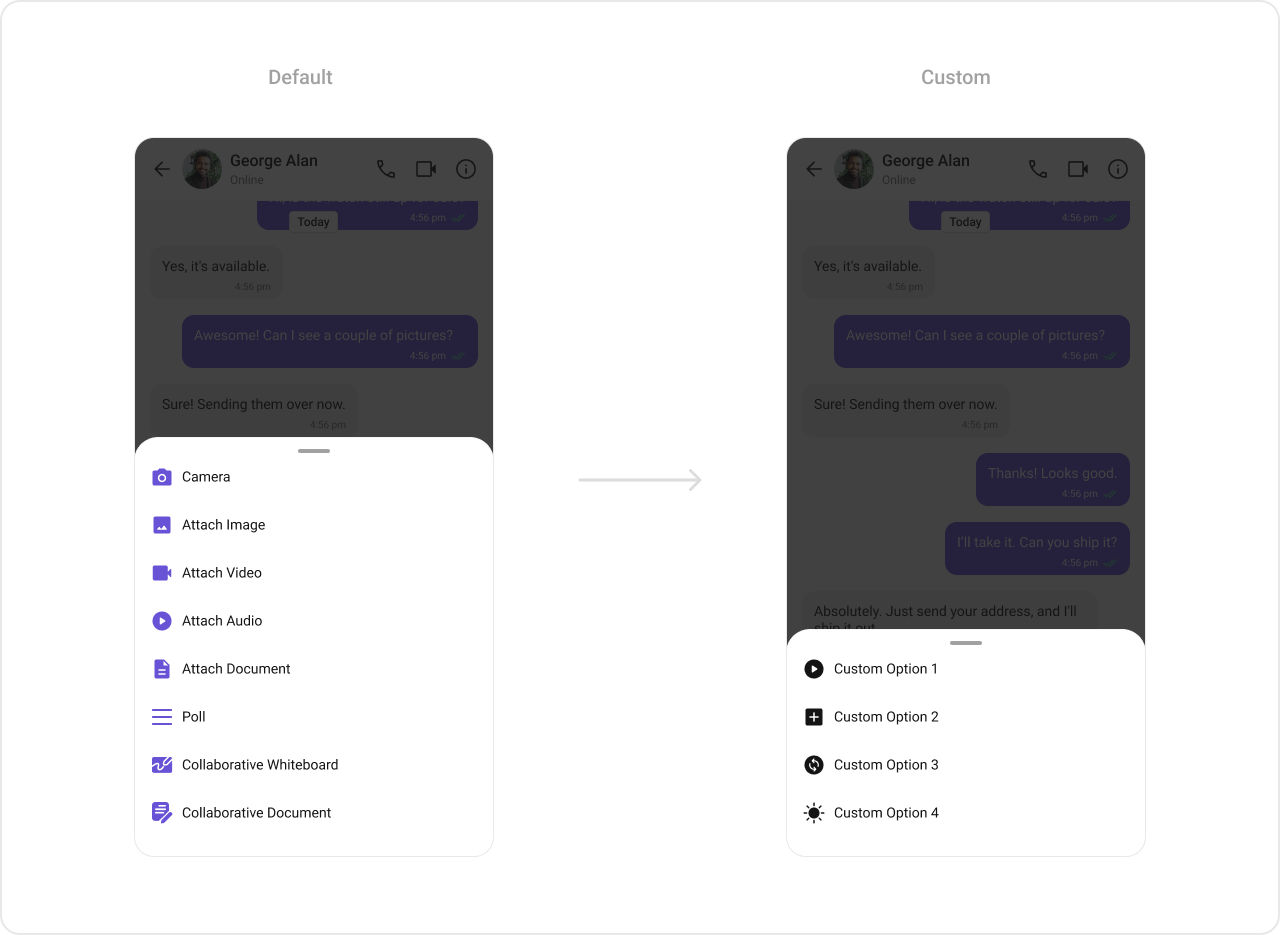
### `setAttachmentOptions`
Replaces the default attachment options with a custom list of `CometChatMessageComposerAction` objects.
```kotlin lines theme={null}
cometChatMessageComposer.setAttachmentOptions(actionList)
```
```java lines theme={null}
cometChatMessageComposer.setAttachmentOptions(actionList);
```
Custom attachment options example:
```kotlin lines theme={null}
val imageView = ImageView(this)
imageView.setImageResource(android.R.drawable.save_icon)
val linearLayout = LinearLayout(this)
linearLayout.orientation = LinearLayout.HORIZONTAL
// code to get default auxiliary buttons
val view = CometChatUIKit
.getDataSource()
.getAuxiliaryOption(
this,
user,
group,
binding.messageComposer.composerViewModel.getIdMap(),
binding.messageComposer.additionParameter
)
linearLayout.addView(view)
linearLayout.addView(imageView)
cometChatMessageComposer.setAuxiliaryButtonView(linearLayout)
```
```java lines theme={null}
ImageView imageView = new ImageView(this);
imageView.setImageResource(R.drawable.save_icon);
LinearLayout linearLayout = new LinearLayout(this);
linearLayout.setOrientation(LinearLayout.HORIZONTAL);
// code to get default auxiliary buttons
View view = CometChatUIKit
.getDataSource()
.getAuxiliaryOption(this,
user,
group,
binding.messageComposer.getComposerViewModel().getIdMap(),
binding.messageComposer.getAdditionParameter());
linearLayout.addView(view);
linearLayout.addView(imageView);
cometChatMessageComposer.setAuxiliaryButtonView(linearLayout);
```
> **What this does:** Creates a horizontal `LinearLayout` containing the default auxiliary buttons (retrieved via `CometChatUIKit.getDataSource().getAuxiliaryOption()`) and a custom `ImageView`. The combined layout replaces the default auxiliary button area, preserving the existing sticker/AI buttons while adding a custom button.
### `setAttachmentOptions`
Replaces the default attachment options with a custom list of `CometChatMessageComposerAction` objects.
```kotlin lines theme={null}
cometChatMessageComposer.setAttachmentOptions(actionList)
```
```java lines theme={null}
cometChatMessageComposer.setAttachmentOptions(actionList);
```
Custom attachment options example:
 ```kotlin lines theme={null}
val actionList = ArrayList()
val action1 = CometChatMessageComposerAction()
action1.title = "Custom Option 1"
action1.icon = R.drawable.ic_cp_1
action1.onClick = {
Toast.makeText(context, "Custom Option 1 !!!", Toast.LENGTH_SHORT).show()
}
actionList.add(action1)
val action2 = CometChatMessageComposerAction()
action2.title = "Custom Option 2"
action2.icon = R.drawable.ic_cp_2
action2.onClick = {
Toast.makeText(context, "Custom Option 2 !!!", Toast.LENGTH_SHORT).show()
}
actionList.add(action2)
val action3 = CometChatMessageComposerAction()
action3.title = "Custom Option 3"
action3.icon = R.drawable.ic_cp_3
action3.onClick = {
Toast.makeText(context, "Custom Option 3 !!!", Toast.LENGTH_SHORT).show()
}
actionList.add(action3)
val action4 = CometChatMessageComposerAction()
action4.title = "Custom Option 4"
action4.icon = R.drawable.ic_cp_4
action4.onClick = {
Toast.makeText(context, "Custom Option 4 !!!", Toast.LENGTH_SHORT).show()
}
actionList.add(action4)
cometChatMessageComposer.setAttachmentOptions(actionList)
```
```java lines theme={null}
List actionList = new ArrayList<>();
CometChatMessageComposerAction action1 = new CometChatMessageComposerAction();
action1.setTitle("Custom Option 1");
action1.setIcon(R.drawable.ic_cp_1);
action1.setOnClick(new OnClick() {
@Override
public void onClick() {
Toast.makeText(context, "Custom Option 1 !!!", Toast.LENGTH_SHORT).show();
}
});
actionList.add(action1);
CometChatMessageComposerAction action2 = new CometChatMessageComposerAction();
action2.setTitle("Custom Option 2");
action2.setIcon(R.drawable.ic_cp_2);
action2.setOnClick(new OnClick() {
@Override
public void onClick() {
Toast.makeText(context, "Custom Option 2 !!!", Toast.LENGTH_SHORT).show();
}
});
actionList.add(action2);
CometChatMessageComposerAction action3 = new CometChatMessageComposerAction();
action3.setTitle("Custom Option 3");
action3.setIcon(R.drawable.ic_cp_3);
action3.setOnClick(new OnClick() {
@Override
public void onClick() {
Toast.makeText(context, "Custom Option 3 !!!", Toast.LENGTH_SHORT).show();
}
});
actionList.add(action3);
CometChatMessageComposerAction action4 = new CometChatMessageComposerAction();
action4.setTitle("Custom Option 4");
action4.setIcon(R.drawable.ic_cp_4);
action4.setOnClick(new OnClick() {
@Override
public void onClick() {
Toast.makeText(context, "Custom Option 4 !!!", Toast.LENGTH_SHORT).show();
}
});
actionList.add(action4);
cometChatMessageComposer.setAttachmentOptions(actionList);
```
> **What this does:** Creates four custom `CometChatMessageComposerAction` objects, each with a title, icon, and click handler. The list replaces the default attachment options (camera, image, video, audio, file, poll, etc.) with these four custom actions.
### `setAIOptions`
Replaces the default AI options with a custom provider function.
```kotlin lines theme={null}
cometChatMessageComposer.setAIOptions { context, user, group, idMap ->
val actionList = ArrayList()
// Build custom AI actions
actionList
}
```
```java lines theme={null}
cometChatMessageComposer.setAIOptions((context, user, group, idMap) -> {
List actionList = new ArrayList<>();
// Build custom AI actions
return actionList;
});
```
> **What this does:** Registers a function that returns a list of `CometChatMessageComposerAction` objects for the AI options sheet. The function receives the current context, user, group, and ID map.
### `setTextFormatters`
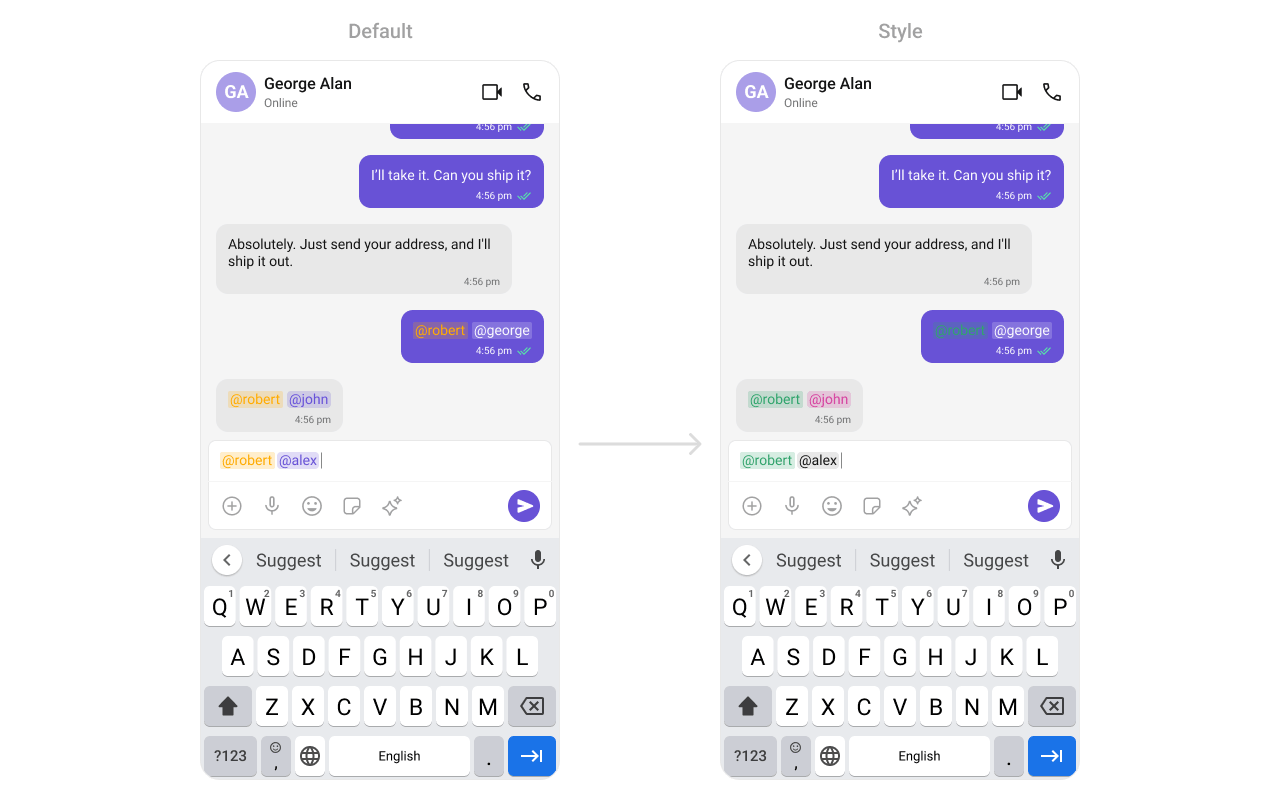
Assigns a list of text formatters. If the provided list is not null, it sets the list. Otherwise, it assigns the default text formatters. To configure the existing Mentions look and feel check out [CometChatMentionsFormatter](/ui-kit/android/mentions-formatter-guide).
```kotlin lines theme={null}
val actionList = ArrayList()
val action1 = CometChatMessageComposerAction()
action1.title = "Custom Option 1"
action1.icon = R.drawable.ic_cp_1
action1.onClick = {
Toast.makeText(context, "Custom Option 1 !!!", Toast.LENGTH_SHORT).show()
}
actionList.add(action1)
val action2 = CometChatMessageComposerAction()
action2.title = "Custom Option 2"
action2.icon = R.drawable.ic_cp_2
action2.onClick = {
Toast.makeText(context, "Custom Option 2 !!!", Toast.LENGTH_SHORT).show()
}
actionList.add(action2)
val action3 = CometChatMessageComposerAction()
action3.title = "Custom Option 3"
action3.icon = R.drawable.ic_cp_3
action3.onClick = {
Toast.makeText(context, "Custom Option 3 !!!", Toast.LENGTH_SHORT).show()
}
actionList.add(action3)
val action4 = CometChatMessageComposerAction()
action4.title = "Custom Option 4"
action4.icon = R.drawable.ic_cp_4
action4.onClick = {
Toast.makeText(context, "Custom Option 4 !!!", Toast.LENGTH_SHORT).show()
}
actionList.add(action4)
cometChatMessageComposer.setAttachmentOptions(actionList)
```
```java lines theme={null}
List actionList = new ArrayList<>();
CometChatMessageComposerAction action1 = new CometChatMessageComposerAction();
action1.setTitle("Custom Option 1");
action1.setIcon(R.drawable.ic_cp_1);
action1.setOnClick(new OnClick() {
@Override
public void onClick() {
Toast.makeText(context, "Custom Option 1 !!!", Toast.LENGTH_SHORT).show();
}
});
actionList.add(action1);
CometChatMessageComposerAction action2 = new CometChatMessageComposerAction();
action2.setTitle("Custom Option 2");
action2.setIcon(R.drawable.ic_cp_2);
action2.setOnClick(new OnClick() {
@Override
public void onClick() {
Toast.makeText(context, "Custom Option 2 !!!", Toast.LENGTH_SHORT).show();
}
});
actionList.add(action2);
CometChatMessageComposerAction action3 = new CometChatMessageComposerAction();
action3.setTitle("Custom Option 3");
action3.setIcon(R.drawable.ic_cp_3);
action3.setOnClick(new OnClick() {
@Override
public void onClick() {
Toast.makeText(context, "Custom Option 3 !!!", Toast.LENGTH_SHORT).show();
}
});
actionList.add(action3);
CometChatMessageComposerAction action4 = new CometChatMessageComposerAction();
action4.setTitle("Custom Option 4");
action4.setIcon(R.drawable.ic_cp_4);
action4.setOnClick(new OnClick() {
@Override
public void onClick() {
Toast.makeText(context, "Custom Option 4 !!!", Toast.LENGTH_SHORT).show();
}
});
actionList.add(action4);
cometChatMessageComposer.setAttachmentOptions(actionList);
```
> **What this does:** Creates four custom `CometChatMessageComposerAction` objects, each with a title, icon, and click handler. The list replaces the default attachment options (camera, image, video, audio, file, poll, etc.) with these four custom actions.
### `setAIOptions`
Replaces the default AI options with a custom provider function.
```kotlin lines theme={null}
cometChatMessageComposer.setAIOptions { context, user, group, idMap ->
val actionList = ArrayList()
// Build custom AI actions
actionList
}
```
```java lines theme={null}
cometChatMessageComposer.setAIOptions((context, user, group, idMap) -> {
List actionList = new ArrayList<>();
// Build custom AI actions
return actionList;
});
```
> **What this does:** Registers a function that returns a list of `CometChatMessageComposerAction` objects for the AI options sheet. The function receives the current context, user, group, and ID map.
### `setTextFormatters`
Assigns a list of text formatters. If the provided list is not null, it sets the list. Otherwise, it assigns the default text formatters. To configure the existing Mentions look and feel check out [CometChatMentionsFormatter](/ui-kit/android/mentions-formatter-guide).
 ```xml themes.xml lines theme={null}
```
```kotlin lines theme={null}
// Initialize CometChatMentionsFormatter
val mentionFormatter = CometChatMentionsFormatter(context)
// set style to customize composer mention text
mentionFormatter.setMessageComposerMentionTextStyle(context, R.style.CustomMessageComposerMentionsStyle)
// This can be passed as an array of formatter in CometChatMessageComposer by using setTextFormatters method.
val textFormatters: MutableList = ArrayList()
textFormatters.add(mentionFormatter)
messageComposer.setTextFormatters(textFormatters)
```
```java lines theme={null}
// Initialize CometChatMentionsFormatter
CometChatMentionsFormatter mentionFormatter = new CometChatMentionsFormatter(context);
// set style to customize composer mention text
mentionFormatter.setMessageComposerMentionTextStyle(context, R.style.CustomMessageComposerMentionsStyle);
// This can be passed as an array of formatter in CometChatMessageComposer by using setTextFormatters method.
List textFormatters = new ArrayList<>();
textFormatters.add(mentionFormatter);
messageComposer.setTextFormatters(textFormatters);
```
> **What this does:** Creates a `CometChatMentionsFormatter`, applies the custom mentions style to it, adds it to a list of text formatters, and sets that list on the `CometChatMessageComposer`. Mentions in the composer input will render with the custom colors and text appearance.
### `setSuggestionListItemView`
Replaces the default suggestion list item view with a custom view holder listener.
```kotlin lines theme={null}
messageComposer.setSuggestionListItemView(suggestionListViewHolderListener)
```
```java lines theme={null}
messageComposer.setSuggestionListItemView(suggestionListViewHolderListener);
```
> **What this does:** Registers a `SuggestionListViewHolderListener` that provides a custom view for each item in the suggestion list (e.g., mentions dropdown).
* **Verify**: After setting any custom view slot, confirm the custom view renders in the correct position within the composer, and the data binding populates correctly.
## Common Patterns
### Text-only composer
```kotlin lines theme={null}
cometChatMessageComposer.setAttachmentButtonVisibility(View.GONE)
cometChatMessageComposer.setVoiceNoteButtonVisibility(View.GONE)
cometChatMessageComposer.setAuxiliaryButtonVisibility(View.GONE)
```
```java lines theme={null}
cometChatMessageComposer.setAttachmentButtonVisibility(View.GONE);
cometChatMessageComposer.setVoiceNoteButtonVisibility(View.GONE);
cometChatMessageComposer.setAuxiliaryButtonVisibility(View.GONE);
```
### Custom attachment options only
```kotlin lines theme={null}
cometChatMessageComposer.setImageAttachmentOptionVisibility(View.GONE)
cometChatMessageComposer.setVideoAttachmentOptionVisibility(View.GONE)
cometChatMessageComposer.setAudioAttachmentOptionVisibility(View.GONE)
cometChatMessageComposer.setCameraAttachmentOptionVisibility(View.GONE)
cometChatMessageComposer.setPollAttachmentOptionVisibility(View.GONE)
cometChatMessageComposer.setCollaborativeDocumentOptionVisibility(View.GONE)
cometChatMessageComposer.setCollaborativeWhiteboardOptionVisibility(View.GONE)
// Only file attachments remain
```
```java lines theme={null}
cometChatMessageComposer.setImageAttachmentOptionVisibility(View.GONE);
cometChatMessageComposer.setVideoAttachmentOptionVisibility(View.GONE);
cometChatMessageComposer.setAudioAttachmentOptionVisibility(View.GONE);
cometChatMessageComposer.setCameraAttachmentOptionVisibility(View.GONE);
cometChatMessageComposer.setPollAttachmentOptionVisibility(View.GONE);
cometChatMessageComposer.setCollaborativeDocumentOptionVisibility(View.GONE);
cometChatMessageComposer.setCollaborativeWhiteboardOptionVisibility(View.GONE);
// Only file attachments remain
```
### Disable voice recording
```kotlin lines theme={null}
cometChatMessageComposer.setVoiceNoteButtonVisibility(View.GONE)
```
```java lines theme={null}
cometChatMessageComposer.setVoiceNoteButtonVisibility(View.GONE);
```
### Prefilled composer with disabled typing events
```kotlin lines theme={null}
cometChatMessageComposer.setInitialComposerText("Hello!")
cometChatMessageComposer.disableTypingEvents(true)
cometChatMessageComposer.disableSoundForMessages(true)
```
```java lines theme={null}
cometChatMessageComposer.setInitialComposerText("Hello!");
cometChatMessageComposer.disableTypingEvents(true);
cometChatMessageComposer.disableSoundForMessages(true);
```
## Advanced Methods
### `setUser` / `setGroup`
Associates the composer with a specific conversation. Use `setUser` for one-on-one and `setGroup` for group conversations.
```kotlin lines theme={null}
// One-on-one conversation
cometChatMessageComposer.setUser(user)
// Group conversation
cometChatMessageComposer.setGroup(group)
```
```java lines theme={null}
// One-on-one conversation
cometChatMessageComposer.setUser(user);
// Group conversation
cometChatMessageComposer.setGroup(group);
```
### `setParentMessageId`
Sets the parent message ID for threaded replies. When set, messages sent from the composer are sent as replies to the specified parent message.
```kotlin lines theme={null}
cometChatMessageComposer.setParentMessageId(parentMessage.id)
```
```java lines theme={null}
cometChatMessageComposer.setParentMessageId(parentMessage.getId());
```
### `setInitialComposerText`
Sets predefined text in the composer input field.
```kotlin lines theme={null}
cometChatMessageComposer.setInitialComposerText("Your_Text")
```
```java lines theme={null}
cometChatMessageComposer.setInitialComposerText("Your_Text");
```
### `getText` / `getProcessedText`
Returns the current text from the composer. `getText` returns the raw text, while `getProcessedText` returns text with formatting (mentions, etc.) applied.
```kotlin lines theme={null}
val rawText = cometChatMessageComposer.text
val processedText = cometChatMessageComposer.processedText
```
```java lines theme={null}
String rawText = cometChatMessageComposer.getText();
String processedText = cometChatMessageComposer.getProcessedText();
```
### Internal Access
These methods provide direct access to internal components for advanced use cases.
| Method | Returns | Description |
| ------------------------ | -------------------------- | -------------------------------------- |
| `getComposerViewModel()` | `MessageComposerViewModel` | The ViewModel managing composer state |
| `getMessageInput()` | `CometChatMessageInput` | The internal message input component |
| `getView()` | `LinearLayout` | The root view of the composer |
| `getAdditionParameter()` | `AdditionParameter` | Additional parameters for the composer |
| `getUser()` | `User` | The currently set user |
| `getGroup()` | `Group` | The currently set group |
> Use these only when the standard API is insufficient. Directly manipulating the ViewModel or internal views may conflict with the component's internal state management.
## Style
The component uses XML theme styles. Define a custom style with parent `CometChatMessageComposerStyle` in `themes.xml`, then apply with `setStyle()`.
```xml themes.xml lines theme={null}
```
```kotlin lines theme={null}
// Initialize CometChatMentionsFormatter
val mentionFormatter = CometChatMentionsFormatter(context)
// set style to customize composer mention text
mentionFormatter.setMessageComposerMentionTextStyle(context, R.style.CustomMessageComposerMentionsStyle)
// This can be passed as an array of formatter in CometChatMessageComposer by using setTextFormatters method.
val textFormatters: MutableList = ArrayList()
textFormatters.add(mentionFormatter)
messageComposer.setTextFormatters(textFormatters)
```
```java lines theme={null}
// Initialize CometChatMentionsFormatter
CometChatMentionsFormatter mentionFormatter = new CometChatMentionsFormatter(context);
// set style to customize composer mention text
mentionFormatter.setMessageComposerMentionTextStyle(context, R.style.CustomMessageComposerMentionsStyle);
// This can be passed as an array of formatter in CometChatMessageComposer by using setTextFormatters method.
List textFormatters = new ArrayList<>();
textFormatters.add(mentionFormatter);
messageComposer.setTextFormatters(textFormatters);
```
> **What this does:** Creates a `CometChatMentionsFormatter`, applies the custom mentions style to it, adds it to a list of text formatters, and sets that list on the `CometChatMessageComposer`. Mentions in the composer input will render with the custom colors and text appearance.
### `setSuggestionListItemView`
Replaces the default suggestion list item view with a custom view holder listener.
```kotlin lines theme={null}
messageComposer.setSuggestionListItemView(suggestionListViewHolderListener)
```
```java lines theme={null}
messageComposer.setSuggestionListItemView(suggestionListViewHolderListener);
```
> **What this does:** Registers a `SuggestionListViewHolderListener` that provides a custom view for each item in the suggestion list (e.g., mentions dropdown).
* **Verify**: After setting any custom view slot, confirm the custom view renders in the correct position within the composer, and the data binding populates correctly.
## Common Patterns
### Text-only composer
```kotlin lines theme={null}
cometChatMessageComposer.setAttachmentButtonVisibility(View.GONE)
cometChatMessageComposer.setVoiceNoteButtonVisibility(View.GONE)
cometChatMessageComposer.setAuxiliaryButtonVisibility(View.GONE)
```
```java lines theme={null}
cometChatMessageComposer.setAttachmentButtonVisibility(View.GONE);
cometChatMessageComposer.setVoiceNoteButtonVisibility(View.GONE);
cometChatMessageComposer.setAuxiliaryButtonVisibility(View.GONE);
```
### Custom attachment options only
```kotlin lines theme={null}
cometChatMessageComposer.setImageAttachmentOptionVisibility(View.GONE)
cometChatMessageComposer.setVideoAttachmentOptionVisibility(View.GONE)
cometChatMessageComposer.setAudioAttachmentOptionVisibility(View.GONE)
cometChatMessageComposer.setCameraAttachmentOptionVisibility(View.GONE)
cometChatMessageComposer.setPollAttachmentOptionVisibility(View.GONE)
cometChatMessageComposer.setCollaborativeDocumentOptionVisibility(View.GONE)
cometChatMessageComposer.setCollaborativeWhiteboardOptionVisibility(View.GONE)
// Only file attachments remain
```
```java lines theme={null}
cometChatMessageComposer.setImageAttachmentOptionVisibility(View.GONE);
cometChatMessageComposer.setVideoAttachmentOptionVisibility(View.GONE);
cometChatMessageComposer.setAudioAttachmentOptionVisibility(View.GONE);
cometChatMessageComposer.setCameraAttachmentOptionVisibility(View.GONE);
cometChatMessageComposer.setPollAttachmentOptionVisibility(View.GONE);
cometChatMessageComposer.setCollaborativeDocumentOptionVisibility(View.GONE);
cometChatMessageComposer.setCollaborativeWhiteboardOptionVisibility(View.GONE);
// Only file attachments remain
```
### Disable voice recording
```kotlin lines theme={null}
cometChatMessageComposer.setVoiceNoteButtonVisibility(View.GONE)
```
```java lines theme={null}
cometChatMessageComposer.setVoiceNoteButtonVisibility(View.GONE);
```
### Prefilled composer with disabled typing events
```kotlin lines theme={null}
cometChatMessageComposer.setInitialComposerText("Hello!")
cometChatMessageComposer.disableTypingEvents(true)
cometChatMessageComposer.disableSoundForMessages(true)
```
```java lines theme={null}
cometChatMessageComposer.setInitialComposerText("Hello!");
cometChatMessageComposer.disableTypingEvents(true);
cometChatMessageComposer.disableSoundForMessages(true);
```
## Advanced Methods
### `setUser` / `setGroup`
Associates the composer with a specific conversation. Use `setUser` for one-on-one and `setGroup` for group conversations.
```kotlin lines theme={null}
// One-on-one conversation
cometChatMessageComposer.setUser(user)
// Group conversation
cometChatMessageComposer.setGroup(group)
```
```java lines theme={null}
// One-on-one conversation
cometChatMessageComposer.setUser(user);
// Group conversation
cometChatMessageComposer.setGroup(group);
```
### `setParentMessageId`
Sets the parent message ID for threaded replies. When set, messages sent from the composer are sent as replies to the specified parent message.
```kotlin lines theme={null}
cometChatMessageComposer.setParentMessageId(parentMessage.id)
```
```java lines theme={null}
cometChatMessageComposer.setParentMessageId(parentMessage.getId());
```
### `setInitialComposerText`
Sets predefined text in the composer input field.
```kotlin lines theme={null}
cometChatMessageComposer.setInitialComposerText("Your_Text")
```
```java lines theme={null}
cometChatMessageComposer.setInitialComposerText("Your_Text");
```
### `getText` / `getProcessedText`
Returns the current text from the composer. `getText` returns the raw text, while `getProcessedText` returns text with formatting (mentions, etc.) applied.
```kotlin lines theme={null}
val rawText = cometChatMessageComposer.text
val processedText = cometChatMessageComposer.processedText
```
```java lines theme={null}
String rawText = cometChatMessageComposer.getText();
String processedText = cometChatMessageComposer.getProcessedText();
```
### Internal Access
These methods provide direct access to internal components for advanced use cases.
| Method | Returns | Description |
| ------------------------ | -------------------------- | -------------------------------------- |
| `getComposerViewModel()` | `MessageComposerViewModel` | The ViewModel managing composer state |
| `getMessageInput()` | `CometChatMessageInput` | The internal message input component |
| `getView()` | `LinearLayout` | The root view of the composer |
| `getAdditionParameter()` | `AdditionParameter` | Additional parameters for the composer |
| `getUser()` | `User` | The currently set user |
| `getGroup()` | `Group` | The currently set group |
> Use these only when the standard API is insufficient. Directly manipulating the ViewModel or internal views may conflict with the component's internal state management.
## Style
The component uses XML theme styles. Define a custom style with parent `CometChatMessageComposerStyle` in `themes.xml`, then apply with `setStyle()`.
 First, create a custom send button drawable:
```html lines theme={null}
```
Then define the custom style in `themes.xml`:
```xml themes.xml lines theme={null}
```
```kotlin lines theme={null}
cometChatMessageComposer.setStyle(R.style.CustomMessageComposerStyle)
```
```java lines theme={null}
cometChatMessageComposer.setStyle(R.style.CustomMessageComposerStyle);
```
To know more such attributes, visit the [attributes file](https://github.com/cometchat/cometchat-uikit-android/blob/v5/chatuikit/src/main/res/values/attr_cometchat_message_composer.xml).
### Programmatic Style Properties
In addition to XML theme styles, the component exposes programmatic setters for fine-grained control:
| Method | Type | Description |
| --------------------------------- | ---------------- | ---------------------------------------------- |
| `setBackgroundColor` | `@ColorInt int` | Background color of the component |
| `setCornerRadius` | `int` | Corner radius of the component |
| `setComposeBoxBackgroundColor` | `@ColorInt int` | Background color of the compose box |
| `setComposeBoxStrokeWidth` | `@Dimension int` | Stroke width of the compose box border |
| `setComposeBoxStrokeColor` | `@ColorInt int` | Stroke color of the compose box border |
| `setComposeBoxCornerRadius` | `@Dimension int` | Corner radius of the compose box |
| `setComposeBoxBackgroundDrawable` | `Drawable` | Custom background drawable for the compose box |
| `setSeparatorColor` | `@ColorInt int` | Color of the separator line |
| `setAttachmentIcon` | `Drawable` | Custom attachment icon drawable |
| `setAttachmentIconTint` | `@ColorInt int` | Tint color for the attachment icon |
| `setVoiceRecordingIcon` | `Drawable` | Custom voice recording icon drawable |
| `setVoiceRecordingIconTint` | `@ColorInt int` | Tint color for the voice recording icon |
| `setAIIcon` | `Drawable` | Custom AI icon drawable |
| `setAIIconTint` | `@ColorInt int` | Tint color for the AI icon |
| `setActiveSendButtonDrawable` | `Drawable` | Drawable for the active send button |
| `setInactiveSendButtonDrawable` | `Drawable` | Drawable for the inactive send button |
| `setActiveStickerIcon` | `Drawable` | Drawable for the active sticker icon |
| `setActiveStickerIconTint` | `@ColorInt int` | Tint for the active sticker icon |
| `setInactiveStickerIcon` | `Drawable` | Drawable for the inactive sticker icon |
| `setInactiveStickerIconTint` | `@ColorInt int` | Tint for the inactive sticker icon |
| `setMessageInputStyle` | `@StyleRes int` | Style for the message input field |
| `setMentionsStyle` | `@StyleRes int` | Style for mentions rendering |
| `setMediaRecorderStyle` | `@StyleRes int` | Style for the media recorder |
| `setSuggestionListStyle` | `@StyleRes int` | Style for the suggestion list |
| `setAttachmentOptionSheetStyle` | `@StyleRes int` | Style for the attachment option sheet |
| `setAIOptionSheetStyle` | `@StyleRes int` | Style for the AI option sheet |
### Edit Preview Style Properties
When editing a message, a preview appears above the input. These properties control its appearance:
| Method | Type | Description |
| ------------------------------------- | ---------------- | -------------------------------------------- |
| `setEditPreviewTitleTextAppearance` | `@StyleRes int` | Text appearance for the edit preview title |
| `setEditPreviewTitleTextColor` | `@ColorInt int` | Text color for the edit preview title |
| `setEditPreviewMessageTextAppearance` | `@StyleRes int` | Text appearance for the edit preview message |
| `setEditPreviewMessageTextColor` | `@ColorInt int` | Text color for the edit preview message |
| `setEditPreviewBackgroundColor` | `@ColorInt int` | Background color for the edit preview |
| `setEditPreviewCornerRadius` | `@Dimension int` | Corner radius for the edit preview |
| `setEditPreviewStrokeColor` | `@ColorInt int` | Stroke color for the edit preview |
| `setEditPreviewStrokeWidth` | `@Dimension int` | Stroke width for the edit preview |
| `setEditPreviewCloseIcon` | `Drawable` | Close icon for the edit preview |
| `setEditPreviewCloseIconTint` | `@ColorInt int` | Tint for the edit preview close icon |
## Customization Matrix
| What to change | Where | Property/API | Example |
| ------------------------------- | ----------------- | -------------------------------------------------------- | --------------------------------------------------------------------------------------------------- |
| Override send button behavior | Activity/Fragment | `setOnSendButtonClick` | `setOnSendButtonClick(sendButtonClick)` |
| Listen for text changes | Activity/Fragment | `setOnTextChangedListener` | `setOnTextChangedListener(textWatcher)` |
| Handle errors | Activity/Fragment | `setOnError` | `setOnError(onError)` |
| Target user | Activity/Fragment | `setUser(User)` | `.setUser(user)` |
| Target group | Activity/Fragment | `setGroup(Group)` | `.setGroup(group)` |
| Thread replies | Activity/Fragment | `setParentMessageId(long)` | `.setParentMessageId(parentMessage.getId())` |
| Attachment button visibility | Activity/Fragment | `setAttachmentButtonVisibility(int)` | `.setAttachmentButtonVisibility(View.GONE)` |
| Voice note button visibility | Activity/Fragment | `setVoiceNoteButtonVisibility(int)` | `.setVoiceNoteButtonVisibility(View.GONE)` |
| Send button visibility | Activity/Fragment | `setSendButtonVisibility(int)` | `.setSendButtonVisibility(View.GONE)` |
| Stickers button visibility | Activity/Fragment | `setStickersButtonVisibility(int)` | `.setStickersButtonVisibility(View.GONE)` |
| Auxiliary button visibility | Activity/Fragment | `setAuxiliaryButtonVisibility(int)` | `.setAuxiliaryButtonVisibility(View.GONE)` |
| Image attachment option | Activity/Fragment | `setImageAttachmentOptionVisibility(int)` | `.setImageAttachmentOptionVisibility(View.GONE)` |
| Camera attachment option | Activity/Fragment | `setCameraAttachmentOptionVisibility(int)` | `.setCameraAttachmentOptionVisibility(View.GONE)` |
| Video attachment option | Activity/Fragment | `setVideoAttachmentOptionVisibility(int)` | `.setVideoAttachmentOptionVisibility(View.GONE)` |
| Audio attachment option | Activity/Fragment | `setAudioAttachmentOptionVisibility(int)` | `.setAudioAttachmentOptionVisibility(View.GONE)` |
| File attachment option | Activity/Fragment | `setFileAttachmentOptionVisibility(int)` | `.setFileAttachmentOptionVisibility(View.GONE)` |
| Poll attachment option | Activity/Fragment | `setPollAttachmentOptionVisibility(int)` | `.setPollAttachmentOptionVisibility(View.GONE)` |
| Collaborative document option | Activity/Fragment | `setCollaborativeDocumentOptionVisibility(int)` | `.setCollaborativeDocumentOptionVisibility(View.GONE)` |
| Collaborative whiteboard option | Activity/Fragment | `setCollaborativeWhiteboardOptionVisibility(int)` | `.setCollaborativeWhiteboardOptionVisibility(View.GONE)` |
| Typing events | Activity/Fragment | `disableTypingEvents(boolean)` | `.disableTypingEvents(true)` |
| Outgoing message sound | Activity/Fragment | `disableSoundForMessages(boolean)` | `.disableSoundForMessages(true)` |
| Custom outgoing message sound | Activity/Fragment | `setCustomSoundForMessages(int)` | `.setCustomSoundForMessages(R.raw.custom_sound)` |
| Predefined text | Activity/Fragment | `setInitialComposerText(String)` | `.setInitialComposerText("Hello!")` |
| Max input lines | Activity/Fragment | `setMaxLine(int)` | `.setMaxLine(5)` |
| Placeholder text | Activity/Fragment | `setPlaceHolderText(String)` | `.setPlaceHolderText("Type a message...")` |
| Disable mentions | Activity/Fragment | `setDisableMentions(boolean)` | `.setDisableMentions(true)` |
| Auxiliary button alignment | Activity/Fragment | `setAuxiliaryButtonAlignment(AuxiliaryButtonsAlignment)` | `.setAuxiliaryButtonAlignment(alignment)` |
| Header view | Activity/Fragment | `setHeaderView(View)` | See `setHeaderView` code above |
| Footer view | Activity/Fragment | `setFooterView(View)` | See `setFooterView` code above |
| Send button view | Activity/Fragment | `setSendButtonView(View)` | See `setSendButtonView` code above |
| Auxiliary button view | Activity/Fragment | `setAuxiliaryButtonView(View)` | See `setAuxiliaryButtonView` code above |
| Attachment options (replace) | Activity/Fragment | `setAttachmentOptions(List)` | See `setAttachmentOptions` code above |
| AI options (replace) | Activity/Fragment | `setAIOptions(Function4)` | See `setAIOptions` code above |
| Text formatters | Activity/Fragment | `setTextFormatters(List)` | See `setTextFormatters` code above |
| Suggestion list item view | Activity/Fragment | `setSuggestionListItemView(listener)` | See `setSuggestionListItemView` code above |
| Attachment icon tint | `themes.xml` | `cometchatMessageComposerAttachmentIconTint` | `
First, create a custom send button drawable:
```html lines theme={null}
```
Then define the custom style in `themes.xml`:
```xml themes.xml lines theme={null}
```
```kotlin lines theme={null}
cometChatMessageComposer.setStyle(R.style.CustomMessageComposerStyle)
```
```java lines theme={null}
cometChatMessageComposer.setStyle(R.style.CustomMessageComposerStyle);
```
To know more such attributes, visit the [attributes file](https://github.com/cometchat/cometchat-uikit-android/blob/v5/chatuikit/src/main/res/values/attr_cometchat_message_composer.xml).
### Programmatic Style Properties
In addition to XML theme styles, the component exposes programmatic setters for fine-grained control:
| Method | Type | Description |
| --------------------------------- | ---------------- | ---------------------------------------------- |
| `setBackgroundColor` | `@ColorInt int` | Background color of the component |
| `setCornerRadius` | `int` | Corner radius of the component |
| `setComposeBoxBackgroundColor` | `@ColorInt int` | Background color of the compose box |
| `setComposeBoxStrokeWidth` | `@Dimension int` | Stroke width of the compose box border |
| `setComposeBoxStrokeColor` | `@ColorInt int` | Stroke color of the compose box border |
| `setComposeBoxCornerRadius` | `@Dimension int` | Corner radius of the compose box |
| `setComposeBoxBackgroundDrawable` | `Drawable` | Custom background drawable for the compose box |
| `setSeparatorColor` | `@ColorInt int` | Color of the separator line |
| `setAttachmentIcon` | `Drawable` | Custom attachment icon drawable |
| `setAttachmentIconTint` | `@ColorInt int` | Tint color for the attachment icon |
| `setVoiceRecordingIcon` | `Drawable` | Custom voice recording icon drawable |
| `setVoiceRecordingIconTint` | `@ColorInt int` | Tint color for the voice recording icon |
| `setAIIcon` | `Drawable` | Custom AI icon drawable |
| `setAIIconTint` | `@ColorInt int` | Tint color for the AI icon |
| `setActiveSendButtonDrawable` | `Drawable` | Drawable for the active send button |
| `setInactiveSendButtonDrawable` | `Drawable` | Drawable for the inactive send button |
| `setActiveStickerIcon` | `Drawable` | Drawable for the active sticker icon |
| `setActiveStickerIconTint` | `@ColorInt int` | Tint for the active sticker icon |
| `setInactiveStickerIcon` | `Drawable` | Drawable for the inactive sticker icon |
| `setInactiveStickerIconTint` | `@ColorInt int` | Tint for the inactive sticker icon |
| `setMessageInputStyle` | `@StyleRes int` | Style for the message input field |
| `setMentionsStyle` | `@StyleRes int` | Style for mentions rendering |
| `setMediaRecorderStyle` | `@StyleRes int` | Style for the media recorder |
| `setSuggestionListStyle` | `@StyleRes int` | Style for the suggestion list |
| `setAttachmentOptionSheetStyle` | `@StyleRes int` | Style for the attachment option sheet |
| `setAIOptionSheetStyle` | `@StyleRes int` | Style for the AI option sheet |
### Edit Preview Style Properties
When editing a message, a preview appears above the input. These properties control its appearance:
| Method | Type | Description |
| ------------------------------------- | ---------------- | -------------------------------------------- |
| `setEditPreviewTitleTextAppearance` | `@StyleRes int` | Text appearance for the edit preview title |
| `setEditPreviewTitleTextColor` | `@ColorInt int` | Text color for the edit preview title |
| `setEditPreviewMessageTextAppearance` | `@StyleRes int` | Text appearance for the edit preview message |
| `setEditPreviewMessageTextColor` | `@ColorInt int` | Text color for the edit preview message |
| `setEditPreviewBackgroundColor` | `@ColorInt int` | Background color for the edit preview |
| `setEditPreviewCornerRadius` | `@Dimension int` | Corner radius for the edit preview |
| `setEditPreviewStrokeColor` | `@ColorInt int` | Stroke color for the edit preview |
| `setEditPreviewStrokeWidth` | `@Dimension int` | Stroke width for the edit preview |
| `setEditPreviewCloseIcon` | `Drawable` | Close icon for the edit preview |
| `setEditPreviewCloseIconTint` | `@ColorInt int` | Tint for the edit preview close icon |
## Customization Matrix
| What to change | Where | Property/API | Example |
| ------------------------------- | ----------------- | -------------------------------------------------------- | --------------------------------------------------------------------------------------------------- |
| Override send button behavior | Activity/Fragment | `setOnSendButtonClick` | `setOnSendButtonClick(sendButtonClick)` |
| Listen for text changes | Activity/Fragment | `setOnTextChangedListener` | `setOnTextChangedListener(textWatcher)` |
| Handle errors | Activity/Fragment | `setOnError` | `setOnError(onError)` |
| Target user | Activity/Fragment | `setUser(User)` | `.setUser(user)` |
| Target group | Activity/Fragment | `setGroup(Group)` | `.setGroup(group)` |
| Thread replies | Activity/Fragment | `setParentMessageId(long)` | `.setParentMessageId(parentMessage.getId())` |
| Attachment button visibility | Activity/Fragment | `setAttachmentButtonVisibility(int)` | `.setAttachmentButtonVisibility(View.GONE)` |
| Voice note button visibility | Activity/Fragment | `setVoiceNoteButtonVisibility(int)` | `.setVoiceNoteButtonVisibility(View.GONE)` |
| Send button visibility | Activity/Fragment | `setSendButtonVisibility(int)` | `.setSendButtonVisibility(View.GONE)` |
| Stickers button visibility | Activity/Fragment | `setStickersButtonVisibility(int)` | `.setStickersButtonVisibility(View.GONE)` |
| Auxiliary button visibility | Activity/Fragment | `setAuxiliaryButtonVisibility(int)` | `.setAuxiliaryButtonVisibility(View.GONE)` |
| Image attachment option | Activity/Fragment | `setImageAttachmentOptionVisibility(int)` | `.setImageAttachmentOptionVisibility(View.GONE)` |
| Camera attachment option | Activity/Fragment | `setCameraAttachmentOptionVisibility(int)` | `.setCameraAttachmentOptionVisibility(View.GONE)` |
| Video attachment option | Activity/Fragment | `setVideoAttachmentOptionVisibility(int)` | `.setVideoAttachmentOptionVisibility(View.GONE)` |
| Audio attachment option | Activity/Fragment | `setAudioAttachmentOptionVisibility(int)` | `.setAudioAttachmentOptionVisibility(View.GONE)` |
| File attachment option | Activity/Fragment | `setFileAttachmentOptionVisibility(int)` | `.setFileAttachmentOptionVisibility(View.GONE)` |
| Poll attachment option | Activity/Fragment | `setPollAttachmentOptionVisibility(int)` | `.setPollAttachmentOptionVisibility(View.GONE)` |
| Collaborative document option | Activity/Fragment | `setCollaborativeDocumentOptionVisibility(int)` | `.setCollaborativeDocumentOptionVisibility(View.GONE)` |
| Collaborative whiteboard option | Activity/Fragment | `setCollaborativeWhiteboardOptionVisibility(int)` | `.setCollaborativeWhiteboardOptionVisibility(View.GONE)` |
| Typing events | Activity/Fragment | `disableTypingEvents(boolean)` | `.disableTypingEvents(true)` |
| Outgoing message sound | Activity/Fragment | `disableSoundForMessages(boolean)` | `.disableSoundForMessages(true)` |
| Custom outgoing message sound | Activity/Fragment | `setCustomSoundForMessages(int)` | `.setCustomSoundForMessages(R.raw.custom_sound)` |
| Predefined text | Activity/Fragment | `setInitialComposerText(String)` | `.setInitialComposerText("Hello!")` |
| Max input lines | Activity/Fragment | `setMaxLine(int)` | `.setMaxLine(5)` |
| Placeholder text | Activity/Fragment | `setPlaceHolderText(String)` | `.setPlaceHolderText("Type a message...")` |
| Disable mentions | Activity/Fragment | `setDisableMentions(boolean)` | `.setDisableMentions(true)` |
| Auxiliary button alignment | Activity/Fragment | `setAuxiliaryButtonAlignment(AuxiliaryButtonsAlignment)` | `.setAuxiliaryButtonAlignment(alignment)` |
| Header view | Activity/Fragment | `setHeaderView(View)` | See `setHeaderView` code above |
| Footer view | Activity/Fragment | `setFooterView(View)` | See `setFooterView` code above |
| Send button view | Activity/Fragment | `setSendButtonView(View)` | See `setSendButtonView` code above |
| Auxiliary button view | Activity/Fragment | `setAuxiliaryButtonView(View)` | See `setAuxiliaryButtonView` code above |
| Attachment options (replace) | Activity/Fragment | `setAttachmentOptions(List)` | See `setAttachmentOptions` code above |
| AI options (replace) | Activity/Fragment | `setAIOptions(Function4)` | See `setAIOptions` code above |
| Text formatters | Activity/Fragment | `setTextFormatters(List)` | See `setTextFormatters` code above |
| Suggestion list item view | Activity/Fragment | `setSuggestionListItemView(listener)` | See `setSuggestionListItemView` code above |
| Attachment icon tint | `themes.xml` | `cometchatMessageComposerAttachmentIconTint` | `- #F76808
` |
| Voice recording icon tint | `themes.xml` | `cometchatMessageComposerVoiceRecordingIconTint` | `- #F76808
` |
| Active sticker icon tint | `themes.xml` | `cometchatMessageComposerActiveStickerIconTint` | `- #F76808
` |
| Inactive sticker icon tint | `themes.xml` | `cometchatMessageComposerInactiveStickerIconTint` | `- #F76808
` |
| AI icon tint | `themes.xml` | `cometchatMessageComposerAIIconTint` | `- #F76808
` |
| Active send button drawable | `themes.xml` | `cometchatMessageComposerActiveSendButtonDrawable` | `- @drawable/active_send_button
` |
| Apply a custom style | Activity/Fragment | `setStyle(int styleRes)` | `cometChatMessageComposer.setStyle(R.style.CustomMessageComposerStyle);` |
| Mentions text style | `themes.xml` | `CometChatMessageComposerMentionsStyle` | `- #000000
` |
| Compose box background | Activity/Fragment | `setComposeBoxBackgroundColor(int)` | `.setComposeBoxBackgroundColor(Color.WHITE)` |
| Compose box stroke | Activity/Fragment | `setComposeBoxStrokeColor(int)` | `.setComposeBoxStrokeColor(Color.GRAY)` |
| Separator color | Activity/Fragment | `setSeparatorColor(int)` | `.setSeparatorColor(Color.LTGRAY)` |
| Edit preview style | Activity/Fragment | `setEditPreview*` methods | See Style section above |
## Next Steps
Display user/group info in the toolbar
Display messages in a conversation
Browse recent conversations
Customize colors, fonts, and styles